# Game Development Problems
Các vấn đề gặp phải trong quá trình phát triển game với Unity
# Các khớp bị cắt khi sử dụng Spine Animation.
#### Vấn đề
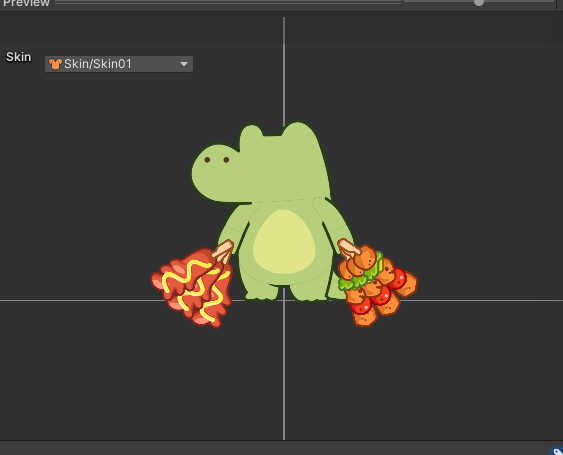
- Lỗi bị viền tại các khớp khi dùng spine animation.
- [](https://knowledge.thanhdv.com/uploads/images/gallery/2025-05/hWoimage.png)
#### Lý do
- Do config export file không trùng với config trong Unity.
#### Giải pháp
- Sử dụng color space Gamma. (để trùng với export mặc định của Unity).
- Đọc thêm tại [spine-unity Assets](https://esotericsoftware.com/spine-unity-assets#Advanced-Premultiplied-vs-Straight-Alpha-Export).
# Không thể using một namespace.
#### Vấn đề
- Không thể sử dụng một namespace dù đã thêm package chính xác và có thể sử dụng ở các flie khác.
#### Trường hợp cụ thể
- SoundsGood by MelenitasDev không thể using UnityEngine.AddressableAssets.
#### Lý do
- Các scripts được biên dịch thành một Assembly riêng biệt. Nếu namespace không được ****Assembly Definition Files (asmdef)**** tham chiếu thì sẽ không sử dụng được.
#### Giải pháp
- Mở file Assembly Definition Files và thêm tham chiếu đến asmdef cần sử dụng (VD: Unity.Addressables…)[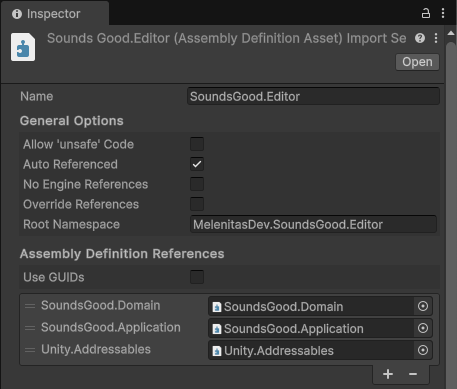](https://knowledge.thanhdv.com/uploads/images/gallery/2025-05/PFoimage.png)
# Copy một List
#### Vấn đề:
- Trong C# khi tạo một list mới bằng các `List list = new(otherList)` thì các phần tử của `list` vẫn được tham chiếu đến các phần tử của `otherList`
#### Nguyên nhân:
- Trong C# khi sử dụng lệnh `List list = new(otherList)` chỉ tạo ra được một shallow copy (copy nông). Các phần tử vẫn được tham chiếu đến một vị trí.
#### Giải pháp
- Tạo ra một deep copy (copy sâu)
- Sử dụng vòng for duyệt và tạo mới từng phần tử sau đó thêm vào list mới.
- Sử dụng Linq để tạo phần từ mới
- `List list = otherList.Select(e => new T()).ToList();`
- `List list = otherList.ConvertAll(e => new T());`
# Release sai cách khi sử dụng Addressables
#### Vấn đề.
Release sai cách khi sử dụng Addressables
Case 1: Early-Release. Với những assets cần sử dụng nhiều lần. Việc Release ngay khi load xong khiến cho mỗi lần cần sử dụng. Asset sẽ phải load từ ổ cứng lên.
```c#
public async UniTask CreateCharacter(CharacterSheet.Row characterData)
{
var handle = Addressables.LoadAssetAsync(characterData.PrefabAddr);
await handle.Task;
GameObject characterObj = resolver.Instantiate(handle.Result);
handle.Release();
return characterObj.GetComponent();
}
```
Case 2: Cache chưa chính xác. Trong trường hơp này handle.Result đã được cache vào Dictionary nhưng handle lại bị release ngay sau đó. Tiềm ẩn vấn đề Value này sẽ được tham chiếu đến một "zombie object" gây ra lỗi `NullReferenceException` hoặc `ArgumentNullException`
```c#
private Dictionary projectileCaches = new();
public async UniTask CreateProjectile(ProjectileSheet.Row projectileData)
{
if (!projectileCaches.TryGetValue(projectileData.Id, out var projectilePrefab))
{
var handle = Addressables.LoadAssetAsync(projectileData.PrefabAddr);
await handle.Task;
projectileCaches.TryAdd(projectileData.Id, handle.Result);
projectilePrefab = handle.Result;
handle.Release();
DebugExtension.Log("Load from disk!!!", Color.red);
}
DebugExtension.Log("Load from cache!!!", Color.green);
GameObject projectileObj = resolver.Instantiate(projectilePrefab);
return projectileObj.GetComponent();
}
```
#### Cơ chế đếm tham chiếu của Addressables
Addressables không hoạt động theo kiểu bật/tắt đơn giản mà sử dụng một cơ chế thông minh gọi là ****Reference Counting.****
Mỗi khi asset được load lên RAM bộ đếm tham chiếu sẽ tăng lên. Và ngược lại mỗi khi release bộ đếm tham chiếu sẽ giảm đi. Asset sẽ chỉ được unload khỏi ram khi ref-count trở về 0.
##### Ví dụ
`A.cs` gọi `handleA = LoadAssetAsync(mySprite)`
- `mySprite` được load vào RAM.
- Ref-Count = 1
`B.cs` gọi `handleA = LoadAssetAsync(mySprite)`
- `mySprite` được lấy từ RAM
- Ref-Count = 2
`A.cs` gọi `handleA.Release()`
- Ref-Count = 1 → `mySprite` vẫn còn trên RAM
Lúc này, nếu có `C.cs` gọi `handleC = LoadAssetAsync(mySprite)` thì
- `mySprite` vẫn được lấy từ RAM.
- Ref-Count = 2
Hoặc nếu `B.cs` gọi `handleB.Release()` thì
- Ref-Count = 0.
- `mySprite` bị unload khỏi RAM.
Tiếp theo, nếu có bất kỳ scripts nào gọi gọi `LoadAssetAsync(mySprite)` thì `mySprite` sẽ được tải lại từ ổ cứng.
#### Giải pháp
Với những object chỉ cần sử dụng một lần. Hoàn toàn có thể release ngay sau khi load.
Với những object sử dụng nhiều lần. Có thể sử dụng ****Addressables.InstantiateAsync()**** hoặc ****cache handle**** để có thể release khi không còn sử dụng đến nữa.
```c#
// Cache handles
public class ProjectileFactory
{
private Dictionary> loadedPrefabs = new();
public async UniTask PreloadProjectiles(List allProjectileData)
{
foreach (var data in allProjectileData)
{
if (!loadedPrefabs.ContainsKey(data.Id))
{
var handle = Addressables.LoadAssetAsync(data.PrefabAddr);
loadedPrefabs.Add(data.Id, handle);
}
}
await UniTask.WhenAll(loadedPrefabs.Values.Select(h => h.AsUniTask()));
}
public IProjectile CreateProjectile(string projectileId)
{
if (loadedPrefabs.TryGetValue(projectileId, out var handle))
{
GameObject projectileObj = resolver.Instantiate(handle.Result);
return projectileObj.GetComponent();
}
return null;
}
public void UnloadAll()
{
foreach(var handle in loadedPrefabs.Values) Addressables.Release(handle);
loadedPrefabs.Clear();
}
}
```