# Release Problems
Vấn đề khi build release dự án Unity
# Build iOS thành công nhưng không có file .xcworkspace
#### Vấn đề
- Khi tích hợp đầy đủ các SDK, cocapods, build iOS trên Unity báo success nhưng không có file .xcworkspace để archive
#### Nguyên nhân
- Do lỗi các mạng quảng cáo không tương thích với phiên bản iOS tối thiểu
- Do các mạng quả cáo không tương thích với Mediation SDK
- ...
#### Giải pháp
1. Sử dụng terminal cd tới folder build iOS (VD: `cd /Users/admin/Unity/Gang2022/Builds/558/iOS`)
2. Chạy lệnh `pod install` để build lại file .xcworkspace
3. Đọc, kiểm tra lỗi và tiếp tục xử lý
- Lỗi `AppLovinMediationGoogleAdapter` không tương thích với `Google-Mobile-Ads-SDK` => ****Sửa phiên bản** `Google-Mobile-Ads-SDK` **trong file** `Podfile`**
```bash
[!] CocoaPods could not find compatible versions for pod "Google-Mobile-Ads-SDK":
In Podfile:
AppLovinMediationGoogleAdapter (= 12.5.0.0) was resolved to 12.5.0.0, which depends on
Google-Mobile-Ads-SDK (= 12.5.0)
Google-Mobile-Ads-SDK (~> 11.13.0)
Specs satisfying the `Google-Mobile-Ads-SDK (~> 11.13.0), Google-Mobile-Ads-SDK (= 12.5.0)` dependency were found, but they required a higher minimum deployment target.
```
- Lỗi `AppLovinMediationMyTargetAdapter` yêu cầu ****phiên bản iOS tối thiểu**** cao hơn => ****trong** `Podfile` **sửa dòng** `platform :ios, 'iOS_version'`** hoặc ****thay đổi** `Target minimum iOS Version` **trong Player Settings****
```bash
[!] CocoaPods could not find compatible versions for pod "AppLovinMediationMyTargetAdapter":
In Podfile:
AppLovinMediationMyTargetAdapter (= 5.30.0.0)
Specs satisfying the `AppLovinMediationMyTargetAdapter (= 5.30.0.0)` dependency were found, but they required a higher minimum deployment target.
```
4. Nếu không còn lỗi và đã có file .xcworkspace thì có thể thực hiện archive trên file .xcworkspace này
#### Lưu ý
- Dùng lệnh `pod install --repo-update` để install đồng thời update tất cả các pod trong `Podfile`
- Dọn dẹp cache
```bash
pod cache clean --all
rm -rf ~/Library/Caches/CocoaPods
rm -rf Pods
rm -f Podfile.lock
```
# Tích hợp FacebookSDK - Open SSL not found
#### Vấn đề
[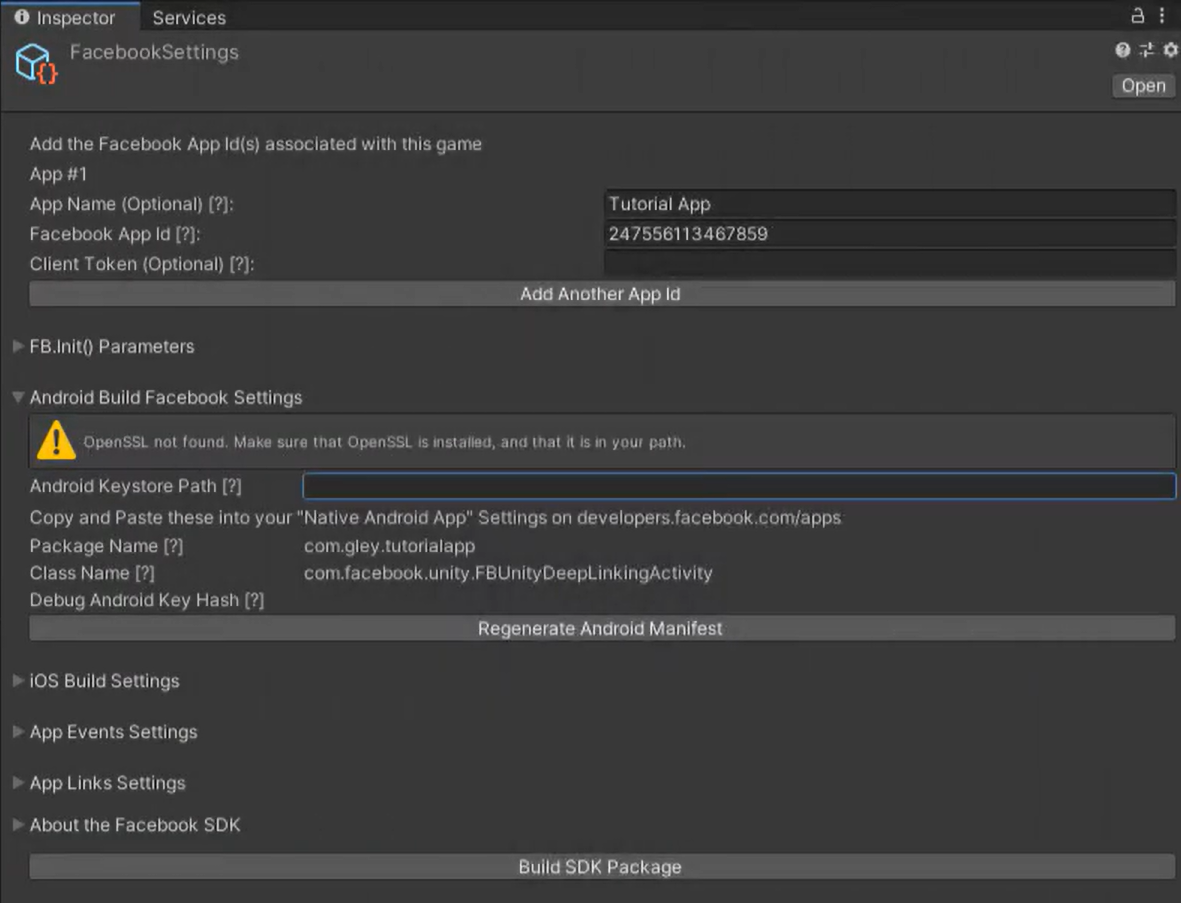](https://knowledge.thanhdv.com/uploads/images/gallery/2025-07/8animage.png)
[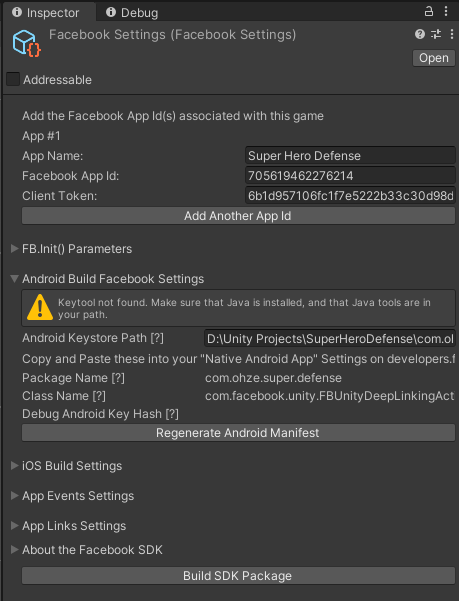](https://knowledge.thanhdv.com/uploads/images/gallery/2025-07/zVwimage.png)
#### Nguyên nhân
Do chưa cài đặt môi trường SSL và Java
#### Giải pháp
##### OpenSSL not found
1. Download and install OpenSSL.
[Win32/Win64 OpenSSL Installer for Windows - Shining Light Productions](http://slproweb.com/products/Win32OpenSSL.html)
Win32 OpenSSL v#.#.# (not Light)
OR Win64 OpenSSL v#.#.# (not Light)
2. Add the OpenSSL directory to your path.
Go to: `Control Panel` → `System` → `Advanced system settings` → `Environment Variables`
Select the Variable `Path` in the “System variables” window and click Edit.
3. Add the path to your OpenSSL bin folder to the end of the “Variable value” text. e.g. I added `;C:\Program Files\OpenSSL-Win64\bin` to the end of the value text.
→ Take note, do not forget to add semi-colon `;` before the `C:/`
4. Restart computer.
##### Keytool not found
1.
# Lỗi Undefined symbol khi build iOS
### Vấn đề
Khi build iOS vẫn thành công. Có file .xcworkspace nhưng khi Archive lại gặp rất nhiều lỗi Undefined symbol như hình dưới.
[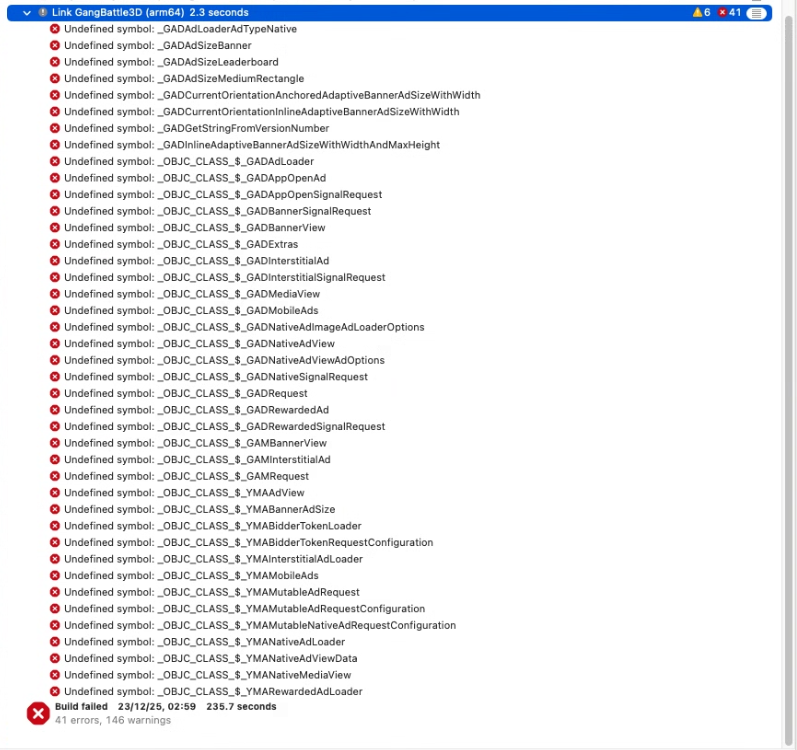](https://knowledge.thanhdv.com/uploads/images/gallery/2025-12/image.png)
### Nguyên nhân
Do các thư viện GoogleMobileAds, YandexMobileAds.... chưa được nhúng vào project.
### Giải pháp
#### Thêm thủ công vào .xcworkspace
Trong của sổ làm việc của XCode chọn project Unity-iPhone > Targets Unity-iPhone > General > **Frameworks, Libraries, and Embedded Content**
Nhấn + để thêm các thư viện còn thiếu. Ở trường hợp trên là GoogleMobileAds.xcframework và YandexMobileAds.xcframework.
[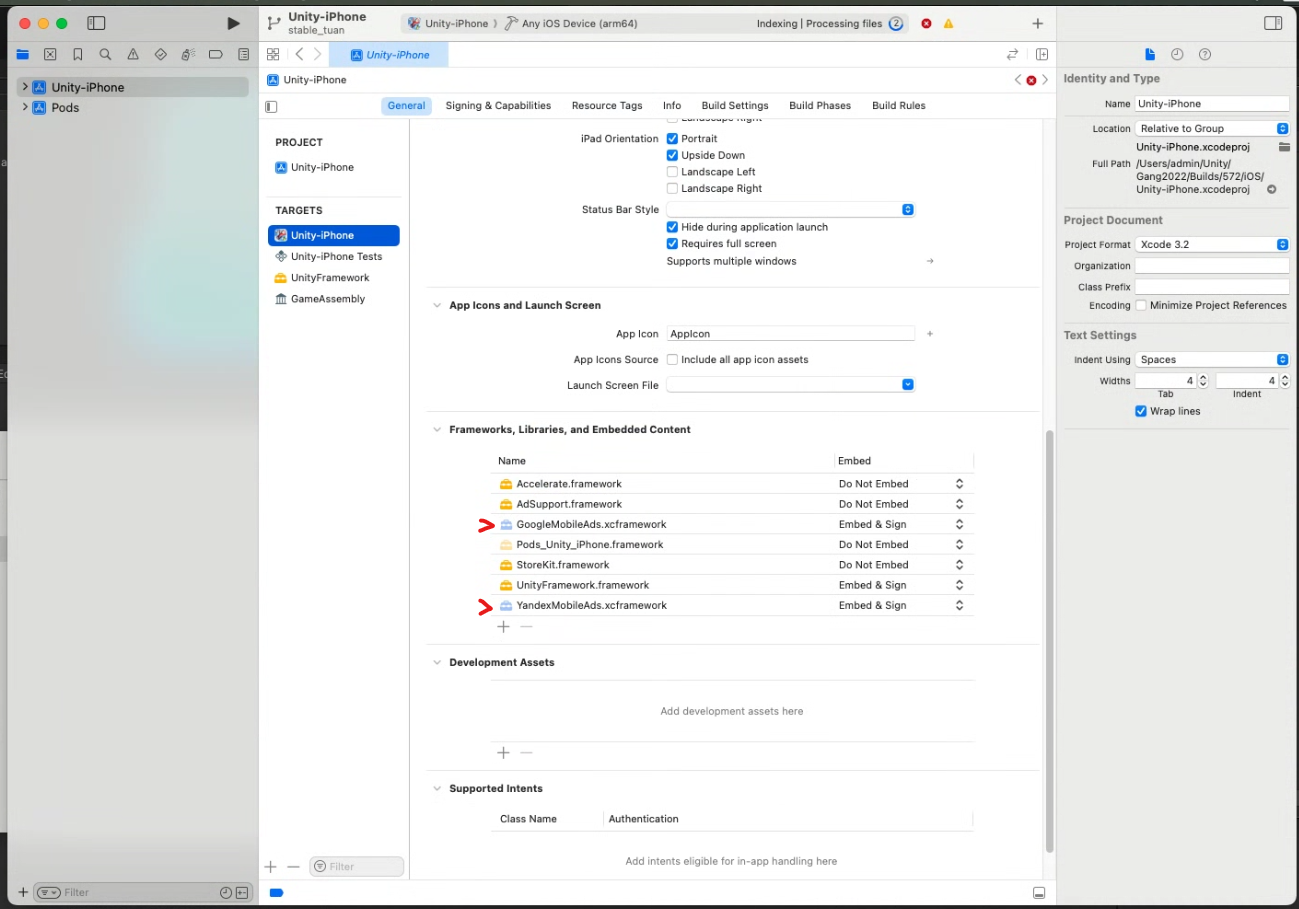](https://knowledge.thanhdv.com/uploads/images/gallery/2025-12/IMvimage.png)
#### Cách khác (không biết gọi là gì =)))))
Với XCode 26.5 khi thêm thủ công file .xcframework có thể sẽ gặp lỗi sau
[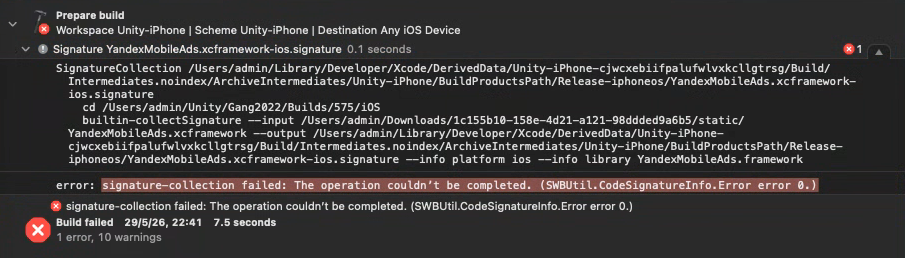](https://knowledge.thanhdv.com/uploads/images/gallery/2026-05/jMmimage.png)
Lỗi này xảy ra với file YandexMobileAds.xcframework được tải trên internet.
Với trường hợp này chúng ta sẽ không thêm thủ công GoogleMobileAds.xcframework và YandexMobileAds.xcframework nữa. Giữ **Frameworks, Libraries, and Embedded Content** như ban đầu.
Trên thanh menu bên trái của Xcode, mở folder Project > Unity-iPhone > Frameworks.
\- Nếu bạn thấy GoogleMobileAds và YandexMobileAds màu đỏ như hình thì chuột phải > Delete > Remove Reference
\- Nếu không thì thôi :)))))
[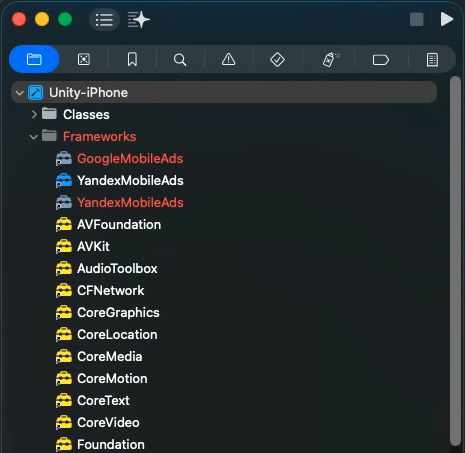](https://knowledge.thanhdv.com/uploads/images/gallery/2026-05/gvcimage.png)
Giờ sang phần Target > Build Settings > tìm "Framework Search Paths" > Nháy đúp vào <Multiple value> và thêm 2 dòng lệnh sau
- `$(SRCROOT)/Pods/YandexMobileAds`
- `$(SRCROOT)/Pods/Google-Mobile-Ads-SDK`
Đây là biến môi trường tự động trỏ đúng vào thư mục project của bạn.
Nhìn sang bên cạnh nếu thấy **non-recursive** thì nhớ chuyển nó thành **recursive.** Để báo cho XCode biết cần phải đi tìm file .xcframework trong các thư mục con.
[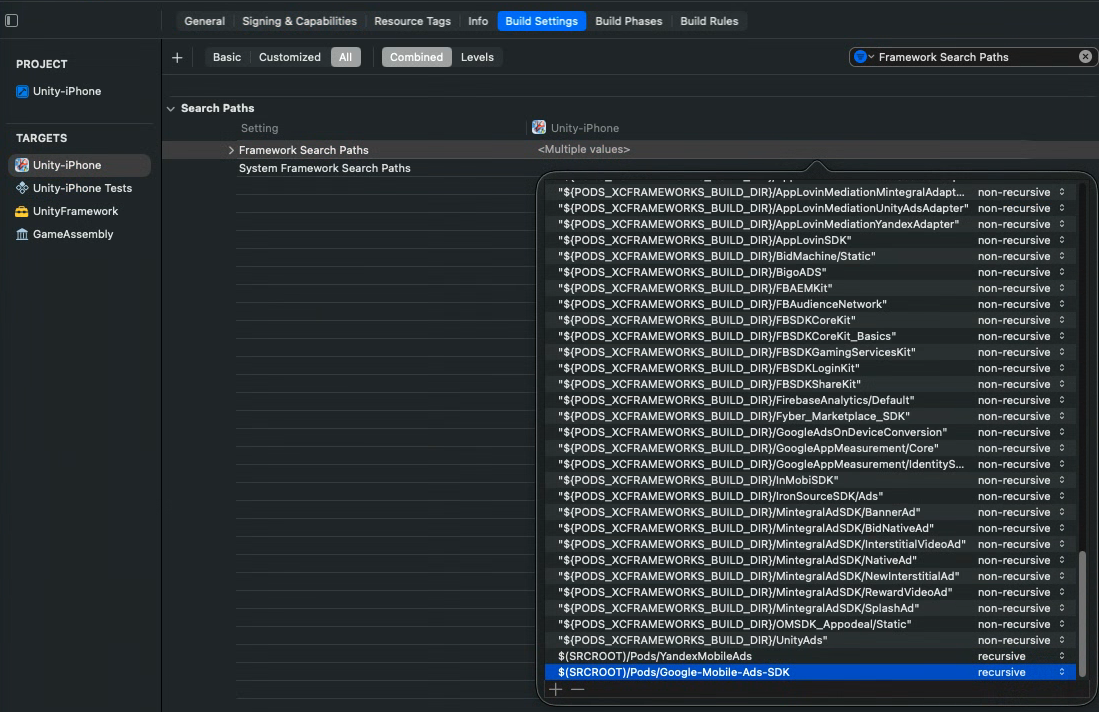](https://knowledge.thanhdv.com/uploads/images/gallery/2026-05/Ky1image.png)
Tiếp tục, vẫn ở Build Settings, tìm "Other Linker Flags", nháy đúp vào và thêm lần lượt 4 dòng sau vào cuối.
`-framework`
`YandexMobileAds`
`-framework`
`GoogleMobileAds`
[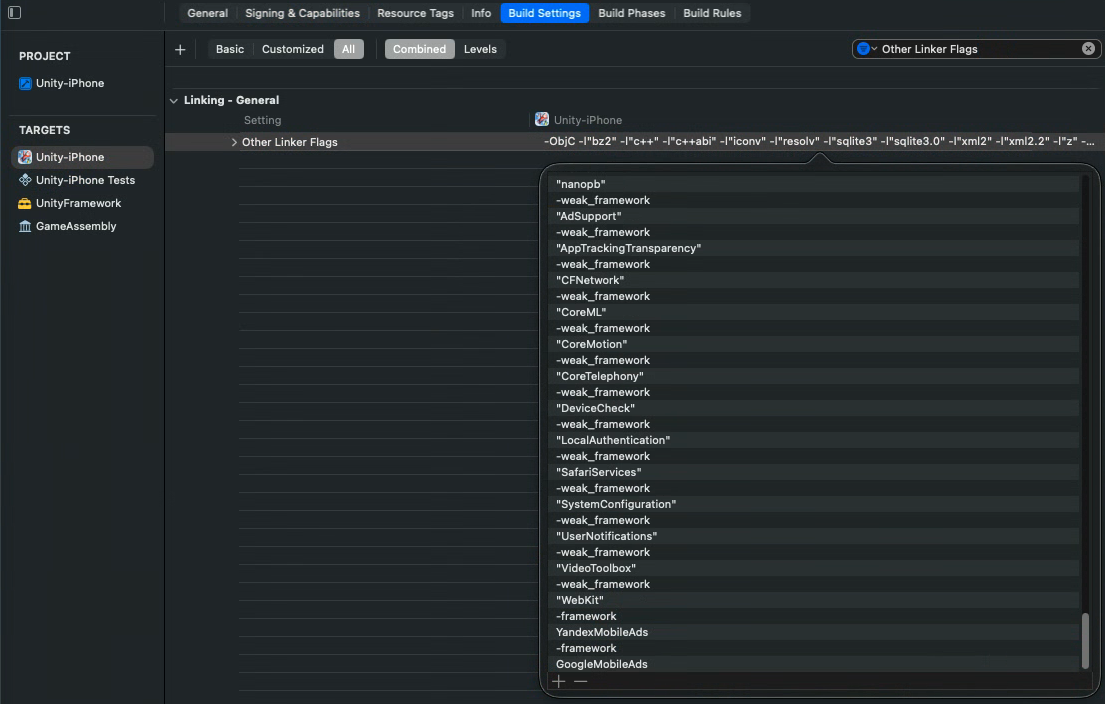](https://knowledge.thanhdv.com/uploads/images/gallery/2026-05/XBcimage.png)
Xong rồi, giờ build thôi :>
À quên, nhớ Clean Build Folder trước khi build nhé.
### Lưu ý
Framework được thêm vào nên có màu xanh (hoặc vàng) nhạt. Nếu màu đậm khả năng cao sẽ gặp lỗi
[](https://knowledge.thanhdv.com/uploads/images/gallery/2025-12/9gTimage.png)
Nếu gặp lỗi như trên có thể chọn **framework từ một dự án khác** đã Archive thành công để thêm vào.
Nếu không có dự án cũ thì có thể tìm và tải file .xcframework trừ internet.
- Với GoogleMobileAds.xcframework có thể tham khảo [link này](https://developers.google.com/admob/ios/download?hl=vi) hoặc search google với từ khóa **GoogleMobileAds.xcframework.**
- Với YandexMobileAds.xcframework có thể tham khảo
- [Link này](https://github.com/CocoaPods/Specs/tree/master/Specs/a/c/5/YandexMobileAds) > tìm phiên bản đang sử dụng > tìm field source.http > sử dụng link này để tải file zip có **YandexMobileAds.xcframework.**
[](https://knowledge.thanhdv.com/uploads/images/gallery/2026-05/5dlimage.png)
- search google với từ khóa **YandexMobileAds.xcframework.**
# Tích hợp FacebookSDK - Lỗi khi Archive trong XCode
### Vấn đề
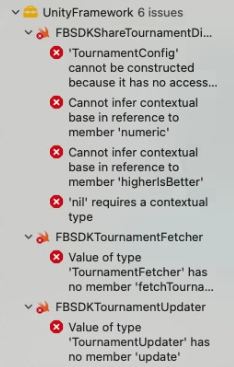
Dự án Unity có tích hợp FacebookSDK. Build iOS thành công nhưng khi Archive trong XCode lại gặp lỗi như hình.
[](https://knowledge.thanhdv.com/uploads/images/gallery/2025-12/NJFimage.png)
### Nguyên nhân
Do xung đột phiên bản FacebookSDK trong Unity và trong XCode
Hoặc, do lỗi của phiên bản FacebookSDK
### Giải pháp
Kiểm tra xem phiên bản FacebookSDK trong Unity và trong Podfile (cùng thư mục với file .xcworkspace) có trùng nhau chưa. Nếu chưa hãy update lại FacebookSDK trong Unity rồi build lại.
Nếu đã trùng nhau nhưng vẫn gặp lỗi. Vấn đề khẳ năng cao là do phiên bản FacebookSDK. Tại đây có 2 cách giải quyết:
- Hạ xuống phiên bản FacebookSDK ổn định hơn. (Trong trường hợp này là **17.0.1**, phiên bản gặp lỗi là **18.0.0**)
- Nếu tính năng bị lỗi là một tính năng mà bạn không sử dụng đến hãy xóa hoặc comment dòng code lỗi đó.
- Tìm đến dòng code báo lỗi và comment lại trong XCode (vẫn phải thực hiện lại trong các lần build sau, trừ khi update FacebookSDK không gặp lỗi)
- Trong Unity, FacebookSDK > SDK > Editor > iOS > Swift > Comment các dòng code báo lỗi tương tự như trên (với cách này thì chỉ cần làm một lần)