# Lỗi Undefined symbol khi build iOS
### Vấn đề
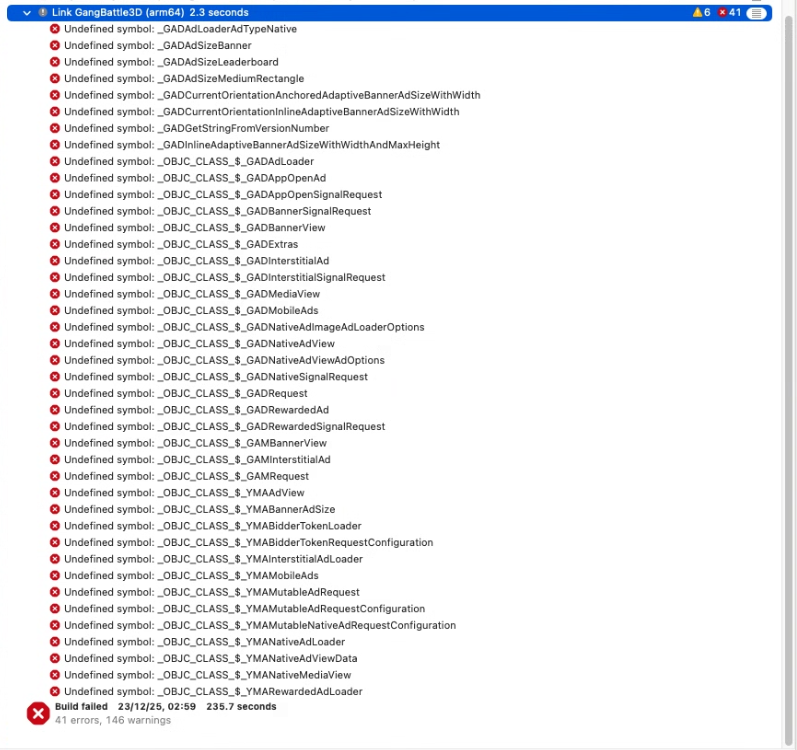
Khi build iOS vẫn thành công. Có file .xcworkspace nhưng khi Archive lại gặp rất nhiều lỗi Undefined symbol như hình dưới.
[](https://knowledge.thanhdv.com/uploads/images/gallery/2025-12/image.png)
### Nguyên nhân
Do các thư viện GoogleMobileAds, YandexMobileAds.... chưa được nhúng vào project.
### Giải pháp
#### Thêm thủ công vào .xcworkspace
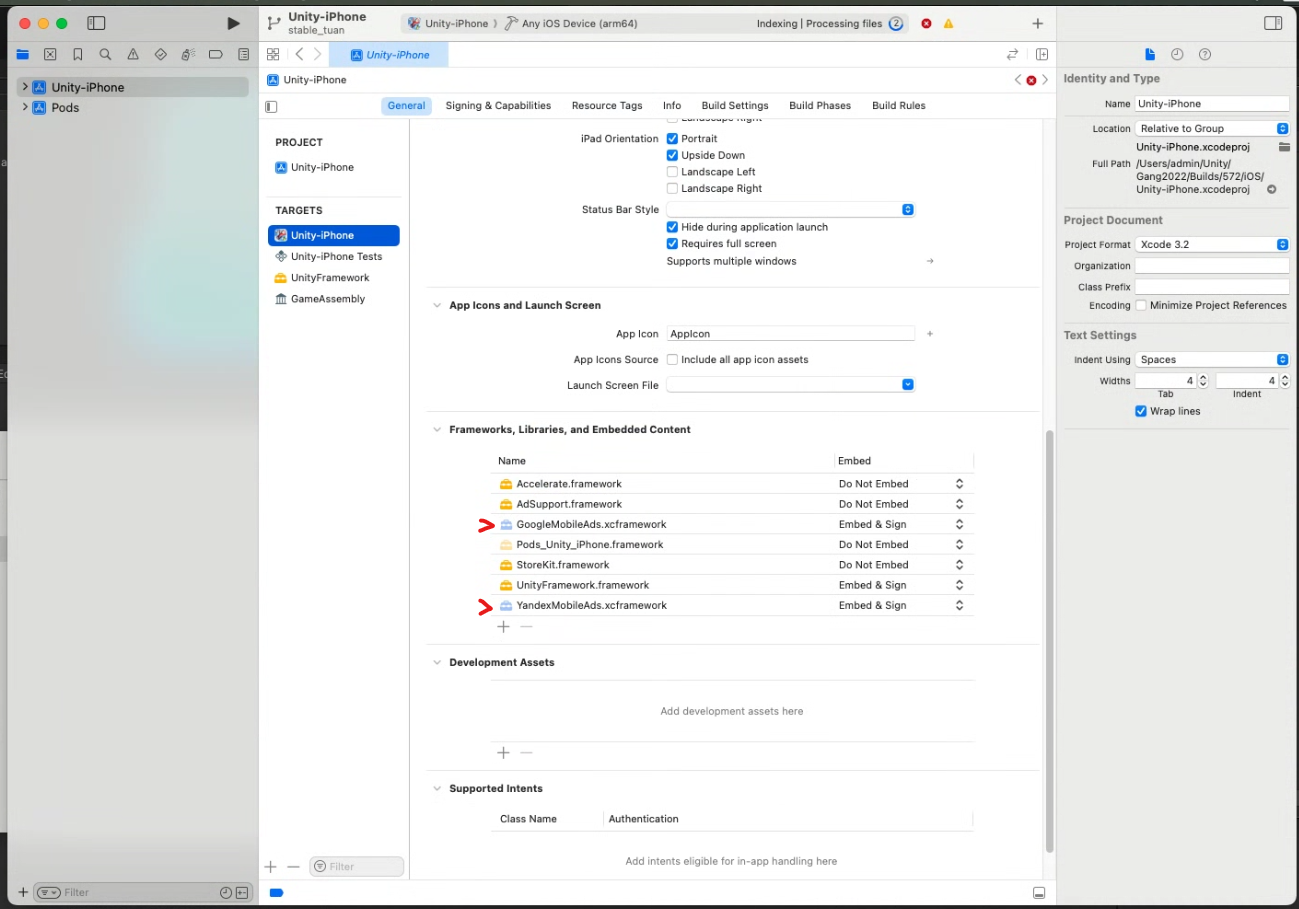
Trong của sổ làm việc của XCode chọn project Unity-iPhone > Targets Unity-iPhone > General > **Frameworks, Libraries, and Embedded Content**
Nhấn + để thêm các thư viện còn thiếu. Ở trường hợp trên là GoogleMobileAds.xcframework và YandexMobileAds.xcframework.
[](https://knowledge.thanhdv.com/uploads/images/gallery/2025-12/IMvimage.png)
#### Cách khác (không biết gọi là gì =)))))
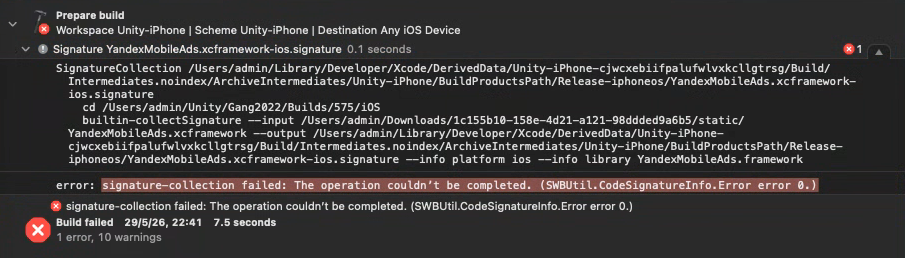
Với XCode 26.5 khi thêm thủ công file .xcframework có thể sẽ gặp lỗi sau
[](https://knowledge.thanhdv.com/uploads/images/gallery/2026-05/jMmimage.png)
Lỗi này xảy ra với file YandexMobileAds.xcframework được tải trên internet.
Với trường hợp này chúng ta sẽ không thêm thủ công GoogleMobileAds.xcframework và YandexMobileAds.xcframework nữa. Giữ **Frameworks, Libraries, and Embedded Content** như ban đầu.
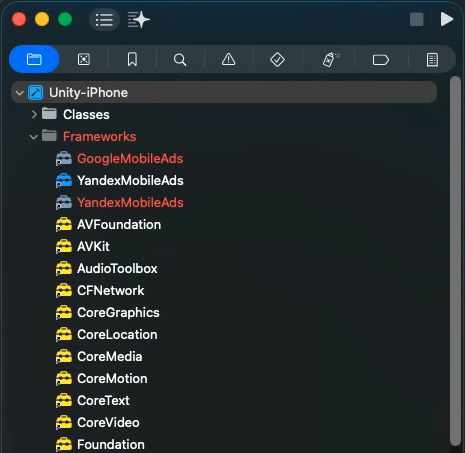
Trên thanh menu bên trái của Xcode, mở folder Project > Unity-iPhone > Frameworks.
\- Nếu bạn thấy GoogleMobileAds và YandexMobileAds màu đỏ như hình thì chuột phải > Delete > Remove Reference
\- Nếu không thì thôi :)))))
[](https://knowledge.thanhdv.com/uploads/images/gallery/2026-05/gvcimage.png)
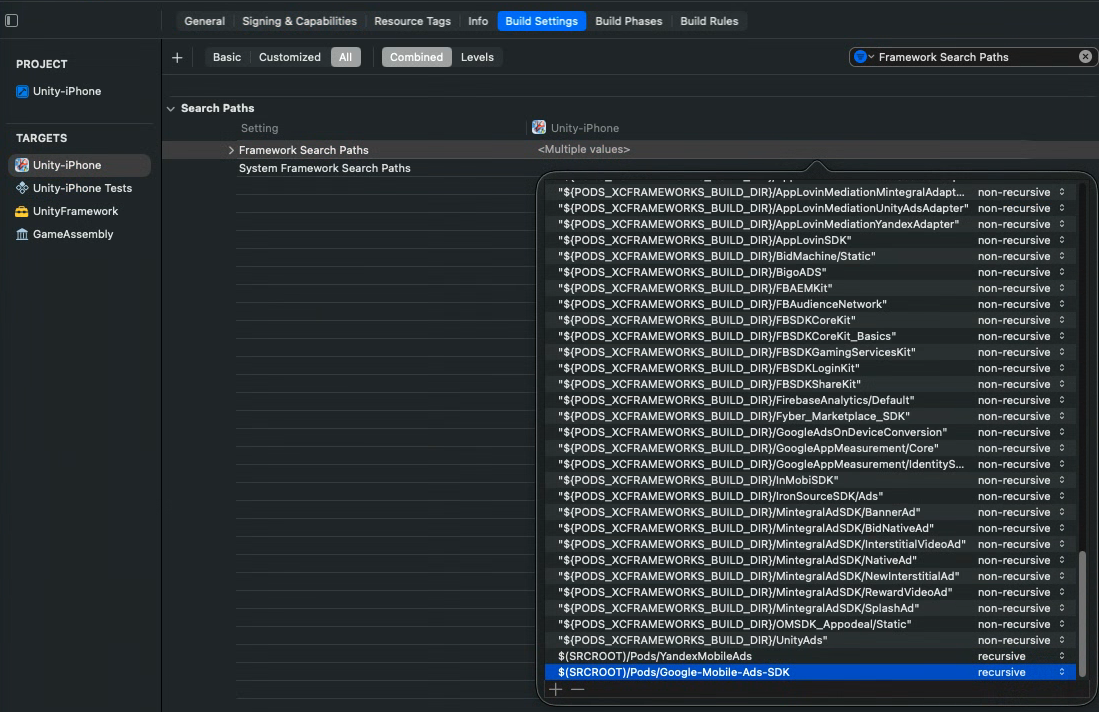
Giờ sang phần Target > Build Settings > tìm "Framework Search Paths" > Nháy đúp vào <Multiple value> và thêm 2 dòng lệnh sau
- `$(SRCROOT)/Pods/YandexMobileAds`
- `$(SRCROOT)/Pods/Google-Mobile-Ads-SDK`
Đây là biến môi trường tự động trỏ đúng vào thư mục project của bạn.
Nhìn sang bên cạnh nếu thấy **non-recursive** thì nhớ chuyển nó thành **recursive.** Để báo cho XCode biết cần phải đi tìm file .xcframework trong các thư mục con.
[](https://knowledge.thanhdv.com/uploads/images/gallery/2026-05/Ky1image.png)
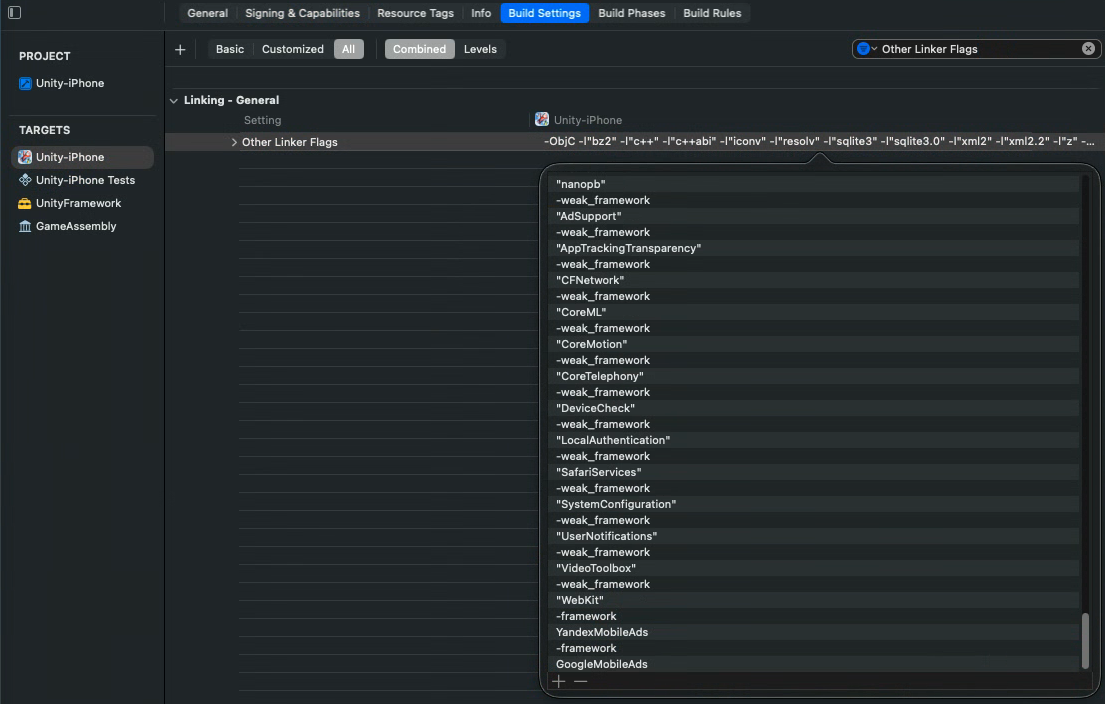
Tiếp tục, vẫn ở Build Settings, tìm "Other Linker Flags", nháy đúp vào và thêm lần lượt 4 dòng sau vào cuối.
`-framework`
`YandexMobileAds`
`-framework`
`GoogleMobileAds`
[](https://knowledge.thanhdv.com/uploads/images/gallery/2026-05/XBcimage.png)
Xong rồi, giờ build thôi :>
À quên, nhớ Clean Build Folder trước khi build nhé.
### Lưu ý
Framework được thêm vào nên có màu xanh (hoặc vàng) nhạt. Nếu màu đậm khả năng cao sẽ gặp lỗi
[](https://knowledge.thanhdv.com/uploads/images/gallery/2025-12/9gTimage.png)
Nếu gặp lỗi như trên có thể chọn **framework từ một dự án khác** đã Archive thành công để thêm vào.
Nếu không có dự án cũ thì có thể tìm và tải file .xcframework trừ internet.
- Với GoogleMobileAds.xcframework có thể tham khảo [link này](https://developers.google.com/admob/ios/download?hl=vi) hoặc search google với từ khóa **GoogleMobileAds.xcframework.**
- Với YandexMobileAds.xcframework có thể tham khảo
- [Link này](https://github.com/CocoaPods/Specs/tree/master/Specs/a/c/5/YandexMobileAds) > tìm phiên bản đang sử dụng > tìm field source.http > sử dụng link này để tải file zip có **YandexMobileAds.xcframework.**
[](https://knowledge.thanhdv.com/uploads/images/gallery/2026-05/5dlimage.png)
- search google với từ khóa **YandexMobileAds.xcframework.**