Verdaccio
Verdaccio is a lightweight private npm proxy registry built in Node.js
Verdaccio
Tổng quan về Verdaccio.
Verdaccio là một proxy server và private registry cho các package.
Tính năng chính.
Lưu trữ các package mà không cần publish lên các package manager public.
Proxy và cache các package public: Verdaccio có thể proxy, cache các package bạn đã tải từ đó giúp:
- Tăng tốc độ cài đặt package
- Giảm phụ thuộc vào internet hoặc registery chính.
- Cải thiện độ ổn định trong CI/CD
Tạo môi trường phát triển an toàn và kiểm soát hơn: Verdaccio cho phép bạn cấu hình quyền truy cập cho user, chỉ ai có quyền truy cập mới có thể publish hoặc install package cụ thể.
Ưu điểm chính.
Dễ cài đặt: Có thể cài đặt bằng lệnh npm install hoặc trên Docker
Không cần cơ sở dữ liệu: Dữ liệu được lưu dưới dạng file (yaml, json) phù hợp với các dự án nhỏ, trung bình.
Tích hợp CI/CD tốt: Hỗ trợ pipeline CI/CD để test, publish các gói nội bộ.
Hỗ trợ plugins: Có thể mở rộng chức năng qua plugin.
Cài đặt Verdaccio.
Trong bài viết này mình sẽ cài Verdaccio bằng Docker trên NAS XPEnology.
Step 1: Prepare
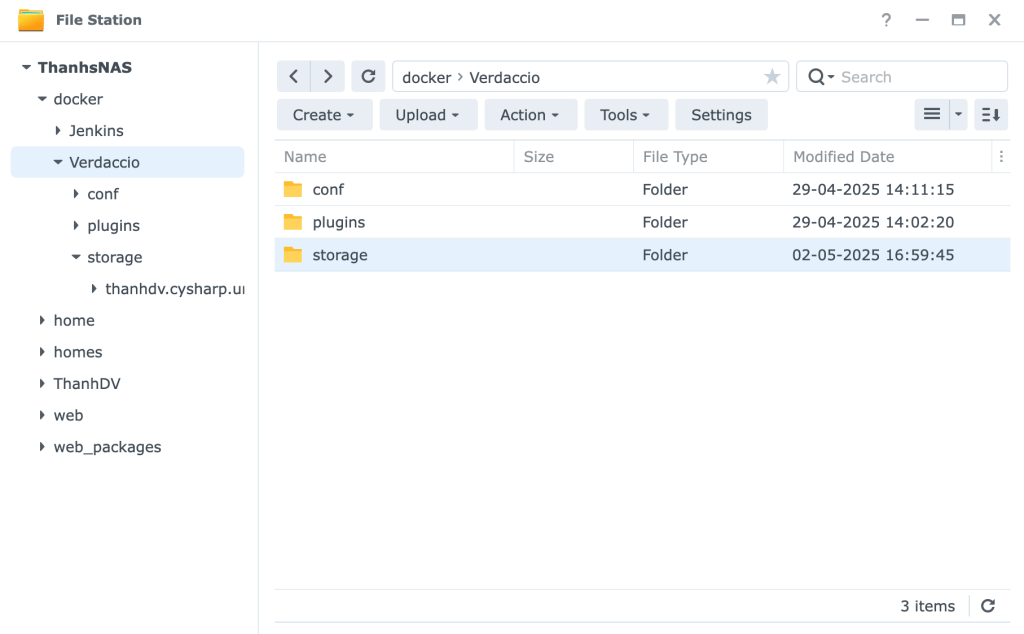
Trong File Station tạo một shared folder tên là docker (có thể sử dụng cho nhiều container) và cấp quyền Read&Write cho ContainerManager (nếu sau này gặp lỗi có thể cấp thêm quyền Read & Write cho Everyone)
Tạo folder Verdaccio bên trong folder docker vừa tạo ở bước trên.
Trong folder Verdaccio tạo thêm các folder conf, plugins, storage để mapping trong quá trình cài đặt container (Việc map folder sẽ giúp tránh mất dữ liệu khi Container gặp vấn đề, hoặc uninstall container)
Trong folder docker/Verdaccio/conf tạo file config.yaml với nội dung như sau:
max_body_size: 143mb

storage: /verdaccio/storage

plugins: /verdaccio/plugins

web:
  enable: true
  title: ThanhDV's Verdaccio

auth:
  htpasswd:
    file: ./htpasswd

packages:
  '@*/*':
    access: $all
    publish: $authenticated
    unpublish: $authenticated
  '**':
    access: $all
    publish: $authenticated
    unpublish: $authenticated

log:
  - { type: stdout, format: pretty, level: info }
Step 2: Download Image
Truy cập Container Manager trên NAS tải về image verdaccio/verdaccio:7x-next
Sau khi tải về xong chuột phải vào image và chọn Run.
Step 3: Setup
General Settings
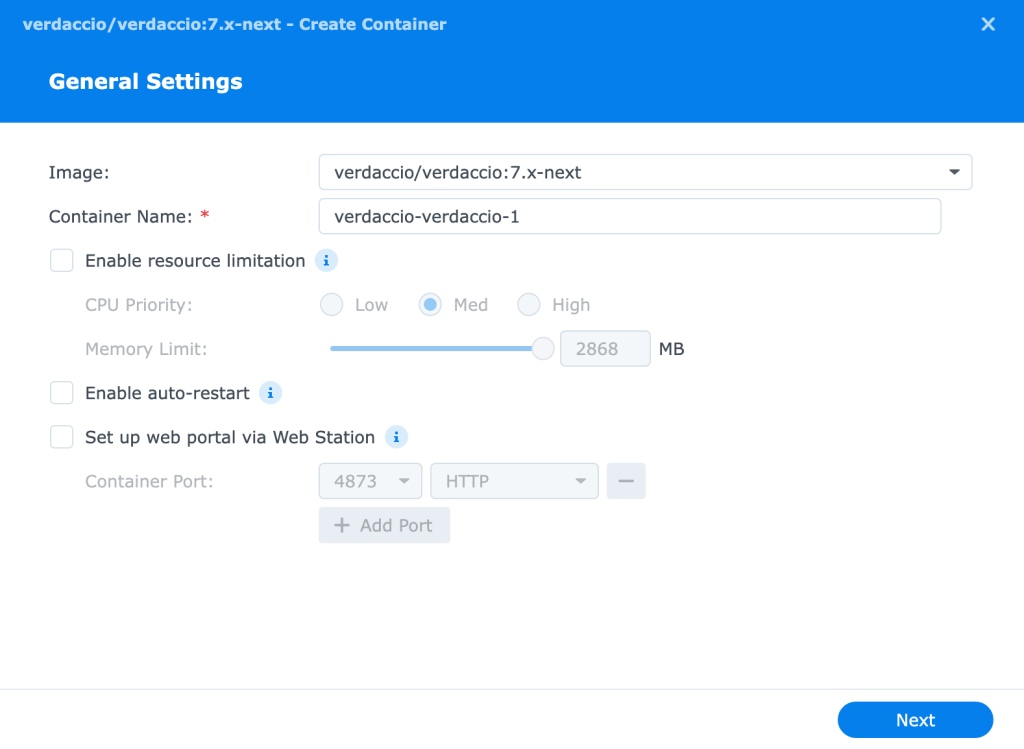
- Container Name: Đặt tuỳ ý
- Enable Auto-restart: Bật để container tự khởi động lại
Xong chọn Next.
Advanced Settings
Port Settings điền số cổng để truy cập đến Verdaccio (mặc định là 4873)
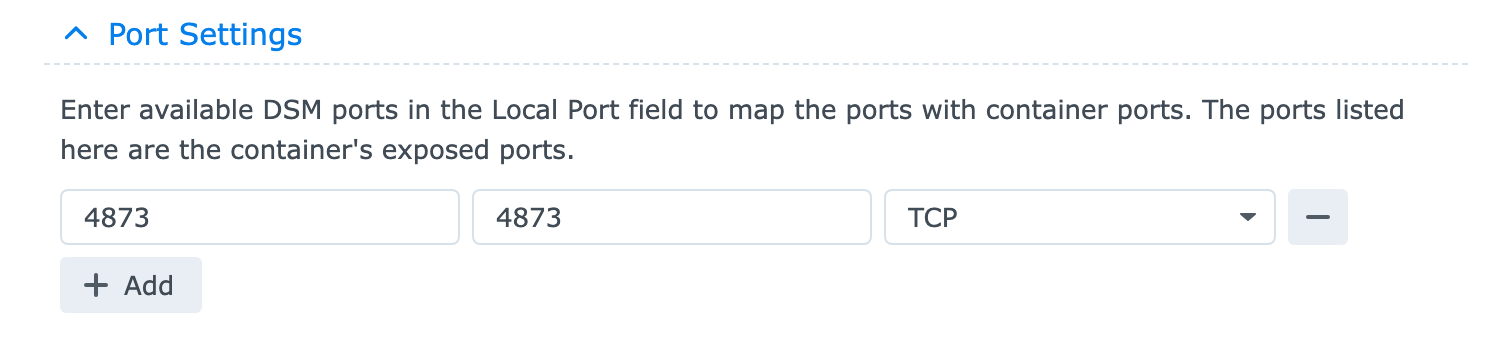
Sau đó nhấn Next.
Kiểm tra lại cài đặt một lượt rồi nhấn Done.
Nếu thành công bạn có thể truy cập giao diện web của Verdaccio qua http://localhost:4873 hoặc nếu bạn có domain riêng đã setup thì có thể truy cập qua domain name http://domain.com:4873
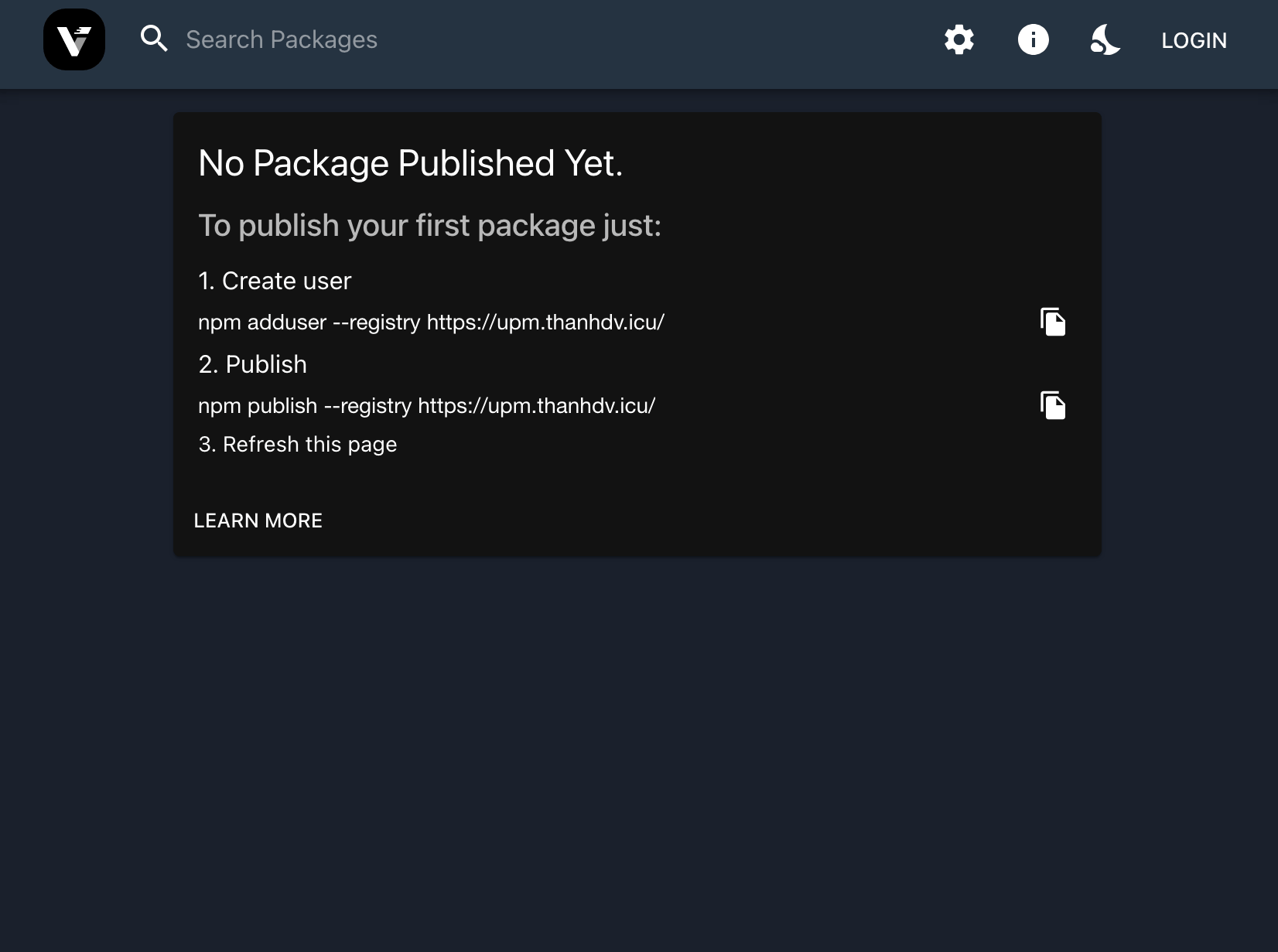
Step 4: Cài đặt Reverse Proxy (Optional)
Trên NAS, tạo Reverse Proxy mới, Control Panel > Login Portal > Advanced > Reverse Proxy > Create
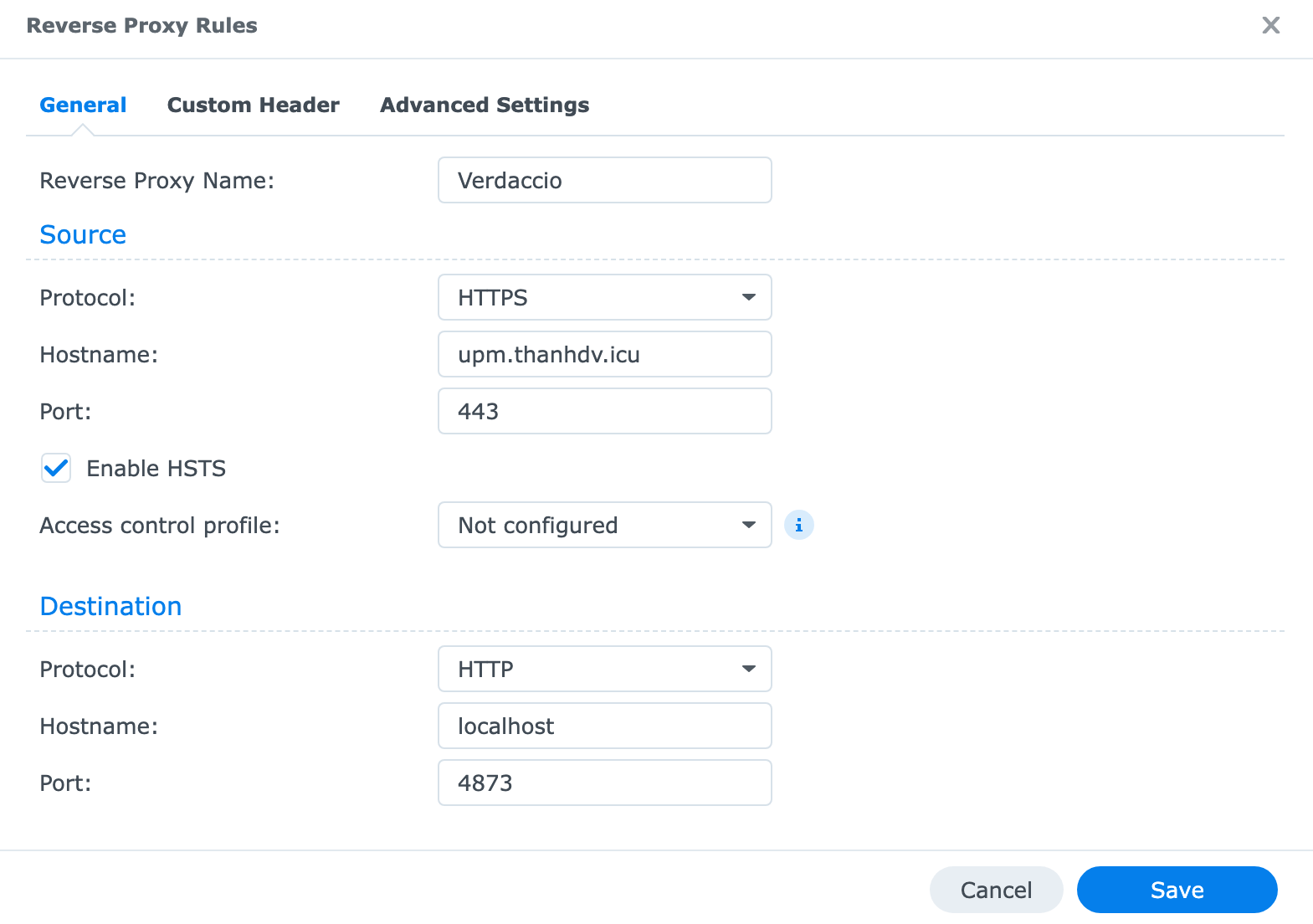
Source
- Reverse Proxy Name: Tuỳ chọn
- Protocol: HTTPS
- Hostname: Địa chỉ bạn muốn sử dụng để truy cập Verdaccio
- Port: 443
- Enable HSTS: true
Destination
- Protocol: HTTP (giao thức của Verdaccio khi cài đặt qua Docker)
- Hostname: localhost (hoặc local IP)
- Port: 4873 (cổng truy cập khi cài đặt trên Docker)
Chọn Save để hoàn tất.
Đến đây mình đã có thể truy cập Verdaccio qua domain. Nhưng vẫn sẽ nhận được thông báo bảo mật. Cần cài đặt thêm Certificate.
Truy cập Control Panel > Security > Certificate > Add tạo một Certificate mới và gán cho địa chỉ vừa tạo ở bước trên.
Doneeeeeeeee!!!!!!!!
Sử dụng cơ bản
Create usernpm adduser --registry https://your-domain.com
Loginnpm login --registry https://your-domain.com
Publishnpm publish --registry https://your-domain.com
Unpublishnpm unpublish package.id --force --registry https://your-domain.com
CI/CD cho Verdaccio với Jenkins
Thiết lập hệ thống CI/CD cho Verdaccio. Tự động publish package khi có commit mới.
Chuẩn bị
Verdaccio Server
Jenkins
Jenkins Plugins
- Blue Ocean
- NodeJS (Cài đặt tự động NodeJS lên Agent)
- Credentials
- Credentials Binding
- GitHub (Cần cho Webhook)
- Discord (Thông báo khi pipeline chạy xong)
Package Repo (Repo trên Git, Github, Gitlab… folder package chứa Jenkinsfile và package.json)
Jenkins Credentials (Cài đặt Credentials)
- Credential cho Verdaccio (chứa username, password đăng nhập Verdaccio)
- Credential cho Github (chứa username và PAT xác thực Github)
- Credential cho Github Secret (chứa Webhook Secret của Github)
- Credential cho Discord Webhook URL (chứa Webhook URL của Discord)
Tạo và cấu hình Jenkins Jobs
Tạo item mới với type là Pipeline.
Cấu hình Jobs
- General (tuỳ chọn)
- Description: mô tả
- Github project: link đến github repo (không quan trọng)
- Trigger
- Chọn GitHub hook trigger for GITScm polling để trigger từ GitHub.
- Poll SCM để kiểm tra bào build định kỳ.
- Để trống nếu muốn chạy thủ công.
- Pipeline
- Definition:
- Pipeline script from SCM để sử dụng jenkinsfile trong repo (recommend)
- Pipeline script để viết trược tiếp jenkinsfile
- SCM chọn Git
- Repositories
- Repository URL: URL của GitHub repo (Ex:
https://github.com/ThanhDang143/Backup.UniTask.git) - Credentials: chọn GitHub Credentials đã tạo.
- Branches to build: nhánh GitHub cần theo dõi
- Repository URL: URL của GitHub repo (Ex:
- Script Path: Đường dẫn đến Jenkinsfile trong repo (mặc định là
Jenkinsfile. Ex:src/UniTask/Assets/Plugins/UniTask/Jenkinsfile)
- Definition:
Chạy và kiểm tra
Tại đây ta đã có thể chạy build thủ công.
Truy cập Blue Ocean. Để theo dõi tiến trình.
Kiểm tra kết quả và debug.
Nếu thành công thì có thể chuyển sang bước tiếp theo.
Cấu hình Trigger tự động
Tiếp đến là cấu hình để Jenkins tự động chạy job khi có commit mới trên GitHub.
- Đảm bảo Jenkins Job đã chọn GitHub hook trigger for GITScm polling khi tạo Job.
- Cấu hình webhook trên GitHub Repo
- Truy cập GitHub Repo > Settings > Webhook > Add webhook
- Payload URL:
- Mặc định là URL Jenkins theo sau là
/github-webhook/(Ex:https://jenkins.thanhdv.com/github-webhook/) - URL Jenkins phải truy cập được từ internet.
- Mặc định là URL Jenkins theo sau là
- Content type: chọn
application/json - Secret là Credential cho Discord Webhook URL đã chuẩn bị
- Which events? chọn
Just the push event. - Đảm bảo đã tick chọn Active > Add Webhook
Sau khi add webhook github sẽ ping tới server. Kiểm tra tab Recent Deliveries để biết trạng thái ping
- Nếu không thành công kiểm tra lại các lỗi cơ bản như sai Payload URL, sai Secret, chưa thêm secret vào Shared secrets
- Nếu thành công có thể push một commit mới để test.
Gửi thông báo qua Discord
Tạo Discord Webhoook, trên Discord truy cập Server Settings > Integrations > Create Webhook.
Copy Webhook URL đã tạo. Truy cập Jenkins Server tạo Credential cho Discord Webhook URL.
Trong bước tiếp theo ta cần cập nhật trong Jenkinsfile (Đã có đầy đủ trong Jenkinsfile demo)
- Tạo một biến môi trường
DISCORD_WEBHOOK = "CREDENTIAL_ID_DISCORD_WEBHOOK_URL"để đảm bảo tính bảo mật không sử dụng trực tiếp Discord Webhook URL trong Jenkinsfile. - Chỉnh sửa bên các khối sự kiện
success{ }, failure { }, aborted { }bên trong khốipostvới nội dung demo như hình dưới. Chỉnh sửa lại nội dung cho phù hợp.
script {
  withCredentials([string(credentialsId: "${env.DISCORD_WEBHOOK}", variable: 'DISCORD_WEBHOOK_URL_SECRET')]) {
    discordSend(
      webhookURL: DISCORD_WEBHOOK_URL_SECRET,
      title: "ℹ️ Aborted: ${env.JOB_NAME}",
      description: "Build #${env.BUILD_NUMBER} for job `${env.JOB_NAME}` was aborted.",
      result: "ABORTED",
      link: env.BUILD_URL,
      footer: "Jenkins Build Notification"
    )
  }
}
Phụ lục
Cài đặt Credentials
Thêm Domain (Tuỳ chọn)
Jenkins Manager > Credentials > System > Add domain. Tại đây điền Name và Desc cho domain mới.
Nếu không tạo domain mới có thể sử dụng domain Global.
Thêm Credentials
Jenkins Manager > Credentials > System > Domain > Add Credentials
- Kind
- Username with password với Credential cho Verdaccio hoặc Credential cho Github…
- Secret text với Credential cho Discord Webhook URL…
- …
- Scope: global
- Username
- Password: password hoặc PAT…
- Secret: chuỗi text
- ID: cần để sử dụng trong Jenkinsfile hoặc những nơi cần thiết…
- Description: mô tả.
Chú ý:
- Với Credential cho GitHub Secret sau khi tạo cần thêm vào Shared secrets
- Jenkins Manager > System > GitHub > Advanced > Shared Secrets > Add Shared Secret tại đây điền ID của Credential.
- Nếu không thấy GitHub kiểm tra lại GitHub Plugin
Lỗi thường gặp khi chạy Jenkins Job
Lỗi FileNotFoundException: Sai đường dẫn. Kiểm tra lại các path trong Jenkinsfile (PROJECT_PATH…)
Lỗi Cannot run program "sh": sh là lệnh của Linux. Nếu máy Agent là Window thay sh bằng bat.
Lỗi RejectedAccessException (new java.net.URI): Bị chặn bởi Script Security sandbox. Phê duyệt tại Jenkins Manager > In-process Script Approval
Jenkinsfile demo
Windows
def packageVersionFromFile = ""
def packageName = ""
def verdaccioPackageUrl = ""

pipeline {
    // Agent with Node.js & Git required
    agent { label "thanhsserver" }

    // Ensure Node.js tool is available (configure in Jenkins Global Tool Config)
    tools {
        nodejs "NodeJS22"
    }

    environment {
        // Path to the directory containing package.json
        PROJECT_PATH = "src/UniTask/Assets/Plugins/UniTask"

        // Verdaccio registry URL
        VERDACCIO_REGISTRY_URL = "https://upm.thanhdv.com"
        // Jenkins Credential ID for Verdaccio auth (e.g., Secret Text or User/Pass with token)
        VERDACCIO_CREDENTIAL_ID = "THANHDV_VERDACCIO_AUTH"

        // Jenkins Credential ID for Git auth (MUST be "Username with password" type)
        // Username: your git username
        // Password: your git access token
        GIT_CREDENTIAL_ID = "THANHDV_GITHUB_JENKINS_CREDENTIAL"

        // Discord webhook create on Discord and add to Jenkins credential
        DISCORD_WEBHOOK = "DISCORD_VERDACCIO_WEBHOOK"

        // Release if commit has this key
        RELEASE_KEYWORD = "Release v"
    }
    // === End Configuration ===

    // Pipeline options
    options {
        timestamps()
        buildDiscarder(logRotator(numToKeepStr: "10"))
        timeout(time: 30, unit: "MINUTES")
        disableConcurrentBuilds()
    }

    stages {
        stage("Checkout") {
            steps {
                // Get source code
                checkout scm
                // git lfs pull // Uncomment if using Git LFS
            }
        }

        // stage("Validate Commit Message") {
        //     steps {
        //         dir(env.PROJECT_PATH) {
        //             script {
        //                 def isManualTrigger = false
        //                 currentBuild.getBuildCauses().each{ cause ->
        //                     if (cause instanceof hudson.model.Cause$UserIdCause || cause.shortDescription.contains("Started by user ")) {
        //                         isManualTrigger = true
        //                     }
        //                 }

        //                 if (isManualTrigger) {
        //                     echo "Build triggered by User! Ignore Validate Commit Message."
        //                 } else {
        //                     def commitMessage = bat(script: 'git log -1 --pretty=%%B', returnStdout: true).trim()
        //                     echo "Checking commit message: ${commitMessage}"
        //                     if (!commitMessage.contains(RELEASE_KEYWORD)) {
        //                         echo "Build condition not met! Aborting pipeline..."
        //                         currentBuild.result = 'ABORTED'
        //                         return
        //                     }
        //                 }

        //                 echo "Commit message is valid for release."
        //             }
        //         }
        //     }
        // }

        stage("Prepare") {
            when {
                expression { return currentBuild.result != "ABORTED" }
            }

            steps {
                // Operate within the project directory
                dir(env.PROJECT_PATH) {
                    script {
                        // Read version directly from package.json
                        def pkg = readJSON file: "package.json" // Assumes package.json is at PROJECT_PATH root
                        if (!pkg || !pkg.version || !pkg.name) {
                             error "Could not read version from package.json"
                        }

                        // Store the version in the script-level variable
                        packageVersionFromFile = pkg.version
                        echo "Package version: ${packageVersionFromFile}"

                        packageName = pkg.name
                        echo "Package name: ${packageName}"

                        verdaccioPackageUrl = "${env.VERDACCIO_REGISTRY_URL}/-/web/detail/${packageName}"
                        echo "Package URL: ${verdaccioPackageUrl}"

                        if (!packageVersionFromFile || !packageName || !verdaccioPackageUrl) {
                             error "Failed to set variable."
                        }

                        withCredentials([usernamePassword(credentialsId: env.VERDACCIO_CREDENTIAL_ID, usernameVariable: "NPM_USER", passwordVariable: "NPM_PASS")]) {
                            echo "Configuring npm for Verdaccio using Username/Password..."
                            // Encrypt username:password to Base64
                            def userPass = "${NPM_USER}:${NPM_PASS}"
                            def encodedAuth = java.util.Base64.getEncoder().encodeToString(userPass.getBytes("UTF-8"))

                            def registryUri = new URI(env.VERDACCIO_REGISTRY_URL)
                            def registryAuthority = registryUri.getAuthority()
                            def registryHostPath = "//${registryAuthority}/"

                            // Configure .npmrc for Verdaccio registry & auth token
                            bat "echo registry=${env.VERDACCIO_REGISTRY_URL} > .npmrc"
                            bat "echo ${registryHostPath}:_auth=\"${encodedAuth}\" >> .npmrc"
                            echo ".npmrc configured."
                        }

                        // Install dependencies (might run prepublish scripts)
                        // echo "Running npm install..."
                        // bat "npm install"
                    }
                }
            }
        }

        stage("Publish") {
            when {
                expression { return currentBuild.result != "ABORTED" }
            }

            steps {
                // Operate within the project directory
                dir(env.PROJECT_PATH) {
                    script {
                        // Use the version read from package.json
                        echo "Publishing package version ${packageVersionFromFile} to ${env.VERDACCIO_REGISTRY_URL}"
                        try {
                            // Publish using npm (reads package.json for name/version, uses .npmrc for auth/registry)
                            bat "npm publish --registry ${env.VERDACCIO_REGISTRY_URL}"
                            echo "Package version ${packageVersionFromFile} published successfully!"
                        } catch (err) {
                            echo "ERROR: Failed to publish package!"
                            error "Publish failed: ${err.getMessage()}"
                        }
                    }
                }
            }
        }

        // // (Optional) Tag commit with the existing version from package.json
        // stage("Tag Existing Version") {
        //     // Only run on overall success so far
        //     when { expression { currentBuild.result == null || currentBuild.result == "SUCCESS" } }
        //     steps {
        //         // Operate within the project directory
        //         dir(env.PROJECT_PATH) {
        //             script {
        //                  echo "Tagging commit with existing version v${packageVersionFromFile}..."

        //                  // Inject Git credentials (Username = Git user, Password = Access Token)
        //                 withCredentials([usernamePassword(credentialsId: env.GIT_CREDENTIAL_ID, usernameVariable: "GIT_USERNAME", passwordVariable: "GIT_ACCESS_TOKEN")]) {

        //                     // Configure Git user (may not be needed if just tagging)
        //                     bat "git config user.email \"vanthanh1998@gmail.com\"" // EDIT Or use a specific user
        //                     bat "git config user.name \"ThanhDVs Jenkins\""

        //                     // NO commit needed here as we didn"t change package.json version via npm version

        //                     // Create annotated tag using the version from package.json
        //                     bat "git tag -a v${packageVersionFromFile} -m \"Release v${packageVersionFromFile}\"" // Use the read version

        //                     // Push tag using HTTPS URL with embedded token
        //                     def repoUrl = scm.userRemoteConfigs[0].url
        //                     if (!repoUrl || !repoUrl.startsWith("https://")) {
        //                         error "Could not determine HTTPS repository URL from SCM configuration."
        //                     }
        //                     def repoUrlClean = repoUrl.replaceAll(/https?:\/\/[^\/]+@/, "https://")
        //                     def pushUrl = repoUrlClean.replaceFirst("https://", "https://${GIT_USERNAME}:${GIT_ACCESS_TOKEN}@")

        //                     // Push only the tag
        //                     bat "git push ${pushUrl} refs/tags/v${packageVersionFromFile}:refs/tags/v${packageVersionFromFile}"

        //                     echo "Version tag v${packageVersionFromFile} pushed successfully."
        //                 }
        //             }
        //         }
        //     }
        // }
    }

    // Post-build actions
    post {
        // Always run cleanup
        always {
            echo "Build finished. Cleaning up..."
            // Clean up sensitive .npmrc file
            dir(env.PROJECT_PATH) {
                script {
                    try {
                        bat "del /F /Q .npmrc"
                    } catch (err) {
                        echo "Could not delete .npmrc (maybe it doesn't exist): ${err.getMessage()}"
                    }
                }
            }
        }

        // On success
        success {
            echo "Pipeline successful!"

            // Save artifacts if need
            // archiveArtifacts artifacts: '**/*.tgz', allowEmptyArchive: true

            echo "Cleaning up workspace..."
            deleteDir()

            echo "Sending success notification to Discord..."
            script {
                // Send
                withCredentials([string(credentialsId: "${env.DISCORD_WEBHOOK}", variable: 'DISCORD_WEBHOOK_URL_SECRET')]) {
                    discordSend(
                        webhookURL: DISCORD_WEBHOOK_URL_SECRET,
                        title: "✅ Success: ${env.JOB_NAME}",
                        description: "Job `${env.JOB_NAME}` build #${env.BUILD_NUMBER} published package `${packageName}@${packageVersionFromFile}` successfully.\nBuild Log: ${env.BUILD_URL}.\nPackage URL: ${verdaccioPackageUrl}",
                        result: "SUCCESS",
                        link: env.BUILD_URL,
                        footer: "Jenkins Build Notification"
                    )
                }
            }
        }

        // On failure
        failure {
            echo "Pipeline failed!"

            echo "Sending failure notification to Discord..."
            script {
                // Send
                withCredentials([string(credentialsId: "${env.DISCORD_WEBHOOK}", variable: 'DISCORD_WEBHOOK_URL_SECRET')]) {
                    discordSend(
                        webhookURL: DISCORD_WEBHOOK_URL_SECRET,
                        title: "❌ Failure: ${env.JOB_NAME}",
                        description: "Job `${env.JOB_NAME}` build #${env.BUILD_NUMBER} failed to publish package `${packageName}`.\nBuild Log: ${env.BUILD_URL}",
                        result: "FAILURE",
                        link: env.BUILD_URL,
                        footer: "Jenkins Build Notification"
                    )
                }
            }
        }

        aborted {
            echo "Pipeline aborted!"
            echo "Sending abort notification to Discord..."
            script {
                // Send
                withCredentials([string(credentialsId: "${env.DISCORD_WEBHOOK}", variable: 'DISCORD_WEBHOOK_URL_SECRET')]) {
                    discordSend(
                        webhookURL: DISCORD_WEBHOOK_URL_SECRET,
                        title: "ℹ️ Aborted: ${env.JOB_NAME}",
                        description: "Build #${env.BUILD_NUMBER} for job `${env.JOB_NAME}` was aborted.",
                        result: "ABORTED",
                        link: env.BUILD_URL,
                        footer: "Jenkins Build Notification"
                    )
                }
            }
        }

        unstable {
            echo "Pipeline unstable!"

            echo "Sending unstable notification to Discord..."
            script {
                withCredentials([string(credentialsId: "${env.DISCORD_WEBHOOK}", variable: 'DISCORD_WEBHOOK_URL_SECRET')]) {
                    discordSend(
                        webhookURL: DISCORD_WEBHOOK_URL_SECRET,
                        title: "⚠️ Unstable: ${env.JOB_NAME}",
                        description: "Job `${env.JOB_NAME}` build #${env.BUILD_NUMBER} finished with unstable status during processing of package `${packageName}`.\nBuild Log: ${env.BUILD_URL}",
                        result: "UNSTABLE",
                        link: env.BUILD_URL,
                        footer: "Jenkins Build Notification"
                    )
                }
            }
        }
    }
}
Linux
def packageVersionFromFile = ""
def packageName = ""
def verdaccioPackageUrl = ""

pipeline {
    // Agent with Node.js & Git required
    agent { label "verdaccio-publisher" }

    // Ensure Node.js tool is available (configure in Jenkins Global Tool Config)
    tools {
        nodejs "NodeJS22"
    }

    environment {
        // Path to the directory containing package.json
        PROJECT_PATH = "Assets/Packages/DeviceDebugger"

        // Verdaccio registry URL
        VERDACCIO_REGISTRY_URL = "https://upm.thanhdv.com"
        // Jenkins Credential ID for Verdaccio auth (e.g., Secret Text or User/Pass with token)
        VERDACCIO_CREDENTIAL_ID = "THANHDV_VERDACCIO_AUTH"

        // Jenkins Credential ID for Git auth (MUST be "Username with password" type)
        // Username: your git username
        // Password: your git access token
        GIT_CREDENTIAL_ID = "THANHDV_GITHUB_JENKINS_CREDENTIAL"

        // Discord webhook create on Discord and add to Jenkins credential
        DISCORD_WEBHOOK = "DISCORD_VERDACCIO_WEBHOOK"

        // Release if commit has this key
        RELEASE_KEYWORD = "Release v"
    }
    // === End Configuration ===

    // Pipeline options
    options {
        timestamps()
        buildDiscarder(logRotator(numToKeepStr: "10"))
        timeout(time: 30, unit: "MINUTES")
        disableConcurrentBuilds()
    }

    stages {
        stage("Checkout") {
            steps {
                // Get source code
                checkout scm
                // git lfs pull // Uncomment if using Git LFS
            }
        }

        // stage("Validate Commit Message") {
        //     steps {
        //         dir(env.PROJECT_PATH) {
        //             script {
        //                 def isManualTrigger = false
        //                 currentBuild.getBuildCauses().each{ cause ->
        //                     if (cause instanceof hudson.model.Cause$UserIdCause || cause.shortDescription.contains("Started by user ")) {
        //                         isManualTrigger = true
        //                     }
        //                 }

        //                 if (isManualTrigger) {
        //                     echo "Build triggered by User! Ignore Validate Commit Message."
        //                 } else {
        //                     def commitMessage = sh(script: 'git log -1 --pretty=%%B', returnStdout: true).trim()
        //                     echo "Checking commit message: ${commitMessage}"
        //                     if (!commitMessage.contains(RELEASE_KEYWORD)) {
        //                         echo "Build condition not met! Aborting pipeline..."
        //                         currentBuild.result = 'ABORTED'
        //                         return
        //                     }
        //                 }

        //                 echo "Commit message is valid for release."
        //             }
        //         }
        //     }
        // }

        stage("Prepare") {
            when {
                expression { return currentBuild.result != "ABORTED" }
            }

            steps {
                // Operate within the project directory
                dir(env.PROJECT_PATH) {
                    script {
                        // Read version directly from package.json
                        def pkg = readJSON file: "package.json" // Assumes package.json is at PROJECT_PATH root
                        if (!pkg || !pkg.version || !pkg.name) {
                             error "Could not read version from package.json"
                        }

                        // Store the version in the script-level variable
                        packageVersionFromFile = pkg.version
                        echo "Package version: ${packageVersionFromFile}"

                        packageName = pkg.name
                        echo "Package name: ${packageName}"

                        verdaccioPackageUrl = "${env.VERDACCIO_REGISTRY_URL}/-/web/detail/${packageName}"
                        echo "Package URL: ${verdaccioPackageUrl}"

                        if (!packageVersionFromFile || !packageName || !verdaccioPackageUrl) {
                             error "Failed to set variable."
                        }

                        withCredentials([usernamePassword(credentialsId: env.VERDACCIO_CREDENTIAL_ID, usernameVariable: "NPM_USER", passwordVariable: "NPM_PASS")]) {
                            echo "Configuring npm for Verdaccio using Username/Password..."
                            // Encrypt username:password to Base64
                            def userPass = "${NPM_USER}:${NPM_PASS}"
                            def encodedAuth = java.util.Base64.getEncoder().encodeToString(userPass.getBytes("UTF-8"))

                            def registryUri = new URI(env.VERDACCIO_REGISTRY_URL)
                            def registryAuthority = registryUri.getAuthority()
                            def registryHostPath = "//${registryAuthority}/"

                            // Configure .npmrc for Verdaccio registry & auth token
                            sh "echo ${registryHostPath}:_auth=\"${encodedAuth}\" > .npmrc"
                            sh "echo registry=${env.VERDACCIO_REGISTRY_URL} >> .npmrc"
                            echo ".npmrc configured."
                        }

                        // Install dependencies (might run prepublish scripts)
                        echo "Running npm install..."
                        sh "npm install"
                    }
                }
            }
        }

        stage("Publish") {
            when {
                expression { return currentBuild.result != "ABORTED" }
            }

            steps {
                // Operate within the project directory
                dir(env.PROJECT_PATH) {
                    script {
                        // Use the version read from package.json
                        echo "Publishing package version ${packageVersionFromFile} to ${env.VERDACCIO_REGISTRY_URL}"
                        try {
                            // Publish using npm (reads package.json for name/version, uses .npmrc for auth/registry)
                            sh "npm publish --registry ${env.VERDACCIO_REGISTRY_URL}"
                            echo "Package version ${packageVersionFromFile} published successfully!"
                        } catch (err) {
                            echo "ERROR: Failed to publish package!"
                            error "Publish failed: ${err.getMessage()}"
                        }
                    }
                }
            }
        }

        // // (Optional) Tag commit with the existing version from package.json
        // stage("Tag Existing Version") {
        //     // Only run on overall success so far
        //     when { expression { currentBuild.result == null || currentBuild.result == "SUCCESS" } }
        //     steps {
        //         // Operate within the project directory
        //         dir(env.PROJECT_PATH) {
        //             script {
        //                  echo "Tagging commit with existing version v${packageVersionFromFile}..."

        //                  // Inject Git credentials (Username = Git user, Password = Access Token)
        //                 withCredentials([usernamePassword(credentialsId: env.GIT_CREDENTIAL_ID, usernameVariable: "GIT_USERNAME", passwordVariable: "GIT_ACCESS_TOKEN")]) {

        //                     // Configure Git user (may not be needed if just tagging)
        //                     sh "git config user.email \"vanthanh1998@gmail.com\"" // EDIT Or use a specific user
        //                     sh "git config user.name \"ThanhDVs Jenkins\""

        //                     // NO commit needed here as we didn"t change package.json version via npm version

        //                     // Create annotated tag using the version from package.json
        //                     sh "git tag -a v${packageVersionFromFile} -m \"Release v${packageVersionFromFile}\"" // Use the read version

        //                     // Push tag using HTTPS URL with embedded token
        //                     def repoUrl = scm.userRemoteConfigs[0].url
        //                     if (!repoUrl || !repoUrl.startsWith("https://")) {
        //                         error "Could not determine HTTPS repository URL from SCM configuration."
        //                     }
        //                     def repoUrlClean = repoUrl.replaceAll(/https?:\/\/[^\/]+@/, "https://")
        //                     def pushUrl = repoUrlClean.replaceFirst("https://", "https://${GIT_USERNAME}:${GIT_ACCESS_TOKEN}@")

        //                     // Push only the tag
        //                     sh "git push ${pushUrl} refs/tags/v${packageVersionFromFile}:refs/tags/v${packageVersionFromFile}"

        //                     echo "Version tag v${packageVersionFromFile} pushed successfully."
        //                 }
        //             }
        //         }
        //     }
        // }
    }

    // Post-build actions
    post {
        // Always run cleanup
        always {
            echo "Build finished. Cleaning up..."
            // Clean up sensitive .npmrc file
            dir(env.PROJECT_PATH) {
                script {
                    try {
                        sh "rm -f .npmrc"
                    } catch (err) {
                        echo "Could not delete .npmrc (maybe it doesn't exist): ${err.getMessage()}"
                    }
                }
            }
        }

        // On success
        success {
            echo "Pipeline successful!"

            // Save artifacts if need
            // archiveArtifacts artifacts: '**/*.tgz', allowEmptyArchive: true

            echo "Cleaning up workspace..."
            deleteDir()

            echo "Sending success notification to Discord..."
            script {
                // Send
                withCredentials([string(credentialsId: "${env.DISCORD_WEBHOOK}", variable: 'DISCORD_WEBHOOK_URL_SECRET')]) {
                    discordSend(
                        webhookURL: DISCORD_WEBHOOK_URL_SECRET,
                        title: "✅ Success: ${env.JOB_NAME}",
                        description: "Job `${env.JOB_NAME}` build #${env.BUILD_NUMBER} published package `${packageName}@${packageVersionFromFile}` successfully.\nBuild Log: ${env.BUILD_URL}.\nPackage URL: ${verdaccioPackageUrl}",
                        result: "SUCCESS",
                        link: env.BUILD_URL,
                        footer: "Jenkins Build Notification"
                    )
                }
            }
        }

        // On failure
        failure {
            echo "Pipeline failed!"

            echo "Sending failure notification to Discord..."
            script {
                // Send
                withCredentials([string(credentialsId: "${env.DISCORD_WEBHOOK}", variable: 'DISCORD_WEBHOOK_URL_SECRET')]) {
                    discordSend(
                        webhookURL: DISCORD_WEBHOOK_URL_SECRET,
                        title: "❌ Failure: ${env.JOB_NAME}",
                        description: "Job `${env.JOB_NAME}` build #${env.BUILD_NUMBER} failed to publish package `${packageName}`.\nBuild Log: ${env.BUILD_URL}",
                        result: "FAILURE",
                        link: env.BUILD_URL,
                        footer: "Jenkins Build Notification"
                    )
                }
            }
        }

        aborted {
            echo "Pipeline aborted!"
            echo "Sending abort notification to Discord..."
            script {
                // Send
                withCredentials([string(credentialsId: "${env.DISCORD_WEBHOOK}", variable: 'DISCORD_WEBHOOK_URL_SECRET')]) {
                    discordSend(
                        webhookURL: DISCORD_WEBHOOK_URL_SECRET,
                        title: "ℹ️ Aborted: ${env.JOB_NAME}",
                        description: "Build #${env.BUILD_NUMBER} for job `${env.JOB_NAME}` was aborted.",
                        result: "ABORTED",
                        link: env.BUILD_URL,
                        footer: "Jenkins Build Notification"
                    )
                }
            }
        }

        unstable {
            echo "Pipeline unstable!"

            echo "Sending unstable notification to Discord..."
            script {
                withCredentials([string(credentialsId: "${env.DISCORD_WEBHOOK}", variable: 'DISCORD_WEBHOOK_URL_SECRET')]) {
                    discordSend(
                        webhookURL: DISCORD_WEBHOOK_URL_SECRET,
                        title: "⚠️ Unstable: ${env.JOB_NAME}",
                        description: "Job `${env.JOB_NAME}` build #${env.BUILD_NUMBER} finished with unstable status during processing of package `${packageName}`.\nBuild Log: ${env.BUILD_URL}",
                        result: "UNSTABLE",
                        link: env.BUILD_URL,
                        footer: "Jenkins Build Notification"
                    )
                }
            }
        }
    }
}
CI/CD cho Verdaccio với GitHub Actions
Lý do chuyển từ Jenkins sang GitHub Actions
Đơn giản hóa cài đặt và bảo trì
Jenkins là một hệ thống lâu đời với rất nhiều plug-in phức tạp. Khi cài đặt và bảo trì rất dễ gặp vấn đề với các plug-in.
Với GitHub Actions. GitHub đã lo phần quản lý máy chủ và bạn có thể tùy chọn triển khai Runner (tương tự Agent) hoặc chọn sử dụng Runner của GitHub (miễn phí có giới hạn).
Đơn giản hóa quy trình
Khi code được lưu trữ trên GitHub bạn sẽ dễ dàng cài đặt và kích hoạt quy trình. Không cần phải config webhook để nối từ GitHub sang Jenkins.
Cộng đồng mạnh mẽ
Với GitHub Actions bạn có thể tận dụng sức mạnh của cộng đồng GameCI đã tạo sẵn các Action cực kỳ mạnh được nhiều người kiểm chứng. Giúp bạn tiết kiệm được cả đống thời gian viết và sửa lỗi kịch bản.
Tính ổn định cao và gần như miễn phí
So với self-host mình đang có thì hạ tầng của GitHub vượt trội hơn về mọi mặt. Từ sức mạnh xử lý, tính ổn định...
Với người dùng miễn phí GitHub Actions giới hạn 2000 phút với các repo private. Các repo của mình chủ yếu là public, và tốc độ publish là rất nhanh (chỉ khoảng 15s) thì GitHub Actions có thể coi là miễn phí đối với mình
Các bước thực hiện
Tạo biến môi trường
Chúng ta cần chuẩn bị 2 biến môi trường để lưu trữ token đăng nhập Verdaccio (VERDACCIO_TOKEN) và Discord Webhook (DISCORD_WEBHOOK)
Lấy Verdaccio token
1. Chạy lệnh npm login --registry https://youraddress.com
2. Tiến hành đăng nhập
3.1 Trên Windows
Mở hộp thoại Run (Win + R) và điền %USERPROFILE%\.npmrc và Enter
3.2 Trên MacOS/Linux
Dùng lệnh cat ~/.npmrc
4. Bạn thấy dòng có dạng sau
//youraddress.com/:_authToken="npm_xxxxxxxxxxxxxxxxx_xxxxxxxxxxxx"
Phần nằm trong dấu nháy kép chính là token bạn cần.
Lấy Discord webhook
1. Truy cập server của bạn
2. Mở settings của channel bạn muốn nhận tin nhắn
3. Chọn mục Integrations (tích hợp) > Webhook
4. Tại đây thêm mới hoặc sao lấy URL Webhook đã có.
Viết kịch bản cho GitHub Actions
Tạo file .github/workflows/publish-verdaccio.yml ngay trong thư mục gốc của repo.
Về nội dung file publish-verdaccio.yml thì tham khảo đoạn code dưới đây.
Nhớ thay đổi working-directory cho phù hợp với dự án đang làm việc
Kịch bản dưới được kích hoạt khi tag mới được push lên bắt đầu bằng chữ "v" (ví dụ: v1.1.1)
Vậy nên sau khi push commit nhớ tạo và push tag để workflow này được kích hoạt.
name: Publish UPM Package
run-name: 📦 ${{ github.event.repository.name }}@${{ github.ref_name }} → Verdaccio

# Triggered when a Git Tag matching v* is pushed
on:
  push:
    tags:
      - 'v*'

jobs:
  publish-package:
    runs-on: ubuntu-latest

    # ====================================================================
    # 🔧 PER-PROJECT CONFIG — change this ONE line when copying to a new project
    # ====================================================================
    defaults:
      run:
        working-directory: Assets/CustomPackages/Utilities

    # ====================================================================
    # 🌐 SHARED CONFIG — same across all your projects, rarely changes
    # ====================================================================
    env:
      REGISTRY_URL: https://upm.thanhdv.com
      NODE_VERSION: '22.x'

    steps:
      # Step 1: Checkout the source code at the pushed tag
      - name: Checkout source
        uses: actions/checkout@v4

      # Step 2: Set up Node.js and point to your Verdaccio registry
      - name: Setup NodeJS & Registry
        uses: actions/setup-node@v4
        with:
          node-version: ${{ env.NODE_VERSION }}
          registry-url: ${{ env.REGISTRY_URL }}

      # Step 3: Extract package info from package.json for Discord notification.
      # - name:        technical id (e.g. "com.tayx.graphy") — used in URL & registry
      # - version:     semver string
      # - displayName: human-friendly name (e.g. "Graphy") — used in Discord title.
      #                Falls back to `name` if displayName is not set in package.json.
      - name: Extract Package Info
        id: pkg-info
        run: |
          echo "name=$(node -p "require('./package.json').name")" >> $GITHUB_OUTPUT
          echo "version=$(node -p "require('./package.json').version")" >> $GITHUB_OUTPUT
          echo "display_name=$(node -p "require('./package.json').displayName || require('./package.json').name")" >> $GITHUB_OUTPUT

      # Step 4: Pack and publish to Verdaccio using the secure token.
      - name: Publish to Verdaccio
        run: npm publish
        env:
          NODE_AUTH_TOKEN: ${{ secrets.VERDACCIO_TOKEN }}

      # Step 5: Send a Discord notification based on job result

      # 1. Notify on SUCCESS
      - name: Discord Notification (Success)
        if: success()
        uses: sarisia/actions-status-discord@v1
        with:
          webhook: ${{ secrets.DISCORD_WEBHOOK }}
          username: "GitHub Actions CI/CD"
          status: success
          nodetail: true # Removes extra detail lines (author, branch, commit) from the notification
          title: "✅ Success: ${{ steps.pkg-info.outputs.display_name }} v${{ steps.pkg-info.outputs.version }}"
          description: |
            Build **#${{ github.run_number }}** published package `${{ steps.pkg-info.outputs.name }}@${{ steps.pkg-info.outputs.version }}` successfully.
            **Build Log:** ${{ github.server_url }}/${{ github.repository }}/actions/runs/${{ github.run_id }}
            **Package URL:** ${{ env.REGISTRY_URL }}/-/web/detail/${{ steps.pkg-info.outputs.name }}

      # 2. Notify on FAILURE
      - name: Discord Notification (Failure)
        if: failure()
        uses: sarisia/actions-status-discord@v1
        with:
          webhook: ${{ secrets.DISCORD_WEBHOOK }}
          username: "GitHub Actions CI/CD"
          status: failure
          nodetail: true
          title: "❌ Failure: ${{ steps.pkg-info.outputs.display_name || github.event.repository.name }} ${{ github.ref_name }}"
          description: |
            Build **#${{ github.run_number }}** failed for package `${{ steps.pkg-info.outputs.name || github.event.repository.name }}` at tag `${{ github.ref_name }}`.
            **Reason:** Publish step failed.
            **Build Log:** ${{ github.server_url }}/${{ github.repository }}/actions/runs/${{ github.run_id }}

      # 3. Notify on CANCELLED
      - name: Discord Notification (Cancelled)
        if: cancelled()
        uses: sarisia/actions-status-discord@v1
        with:
          webhook: ${{ secrets.DISCORD_WEBHOOK }}
          username: "GitHub Actions CI/CD"
          status: cancelled
          nodetail: true
          title: "ℹ️ Cancelled: ${{ steps.pkg-info.outputs.display_name || github.event.repository.name }} ${{ github.ref_name }}"
          description: |
            Build **#${{ github.run_number }}** for job `${{ github.workflow }}` at tag `${{ github.ref_name }}` was aborted manually.
            **Build Log:** ${{ github.server_url }}/${{ github.repository }}/actions/runs/${{ github.run_id }}
Kiểm tra
Sau khi push bạn có thể truy cập repo trên GitHub để kiểm tra.
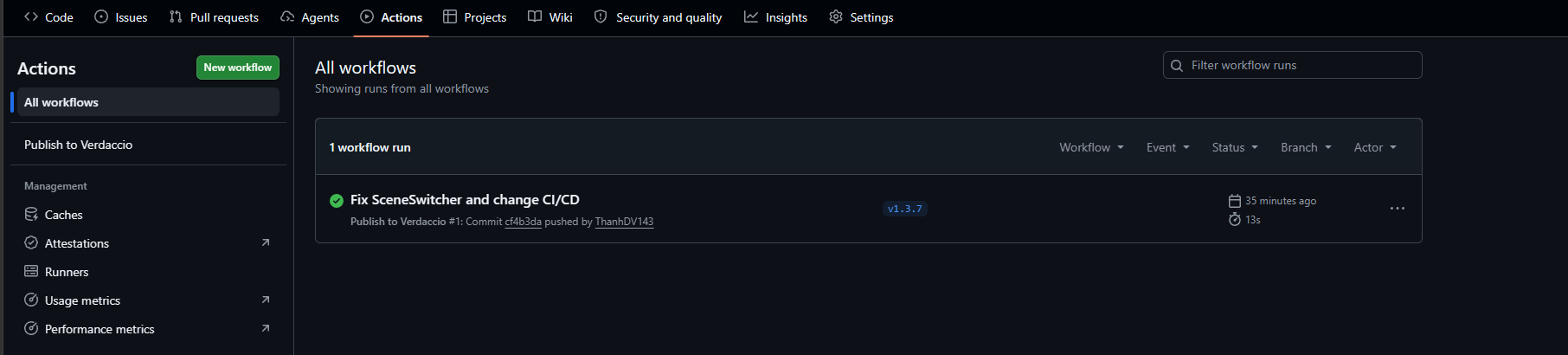
Nếu thấy bên side tab có hiện workflow bạn vừa tạo tức là đã không có lỗi cú pháp và GitHub đã nhận dược workflow.
Hiển thị như hình dưới tức là đã publish thành công.