CI/CD cho Verdaccio với GitHub Actions
Lý do chuyển từ Jenkins sang GitHub Actions
Đơn giản hóa cài đặt và bảo trì
Jenkins là một hệ thống lâu đời với rất nhiều plug-in phức tạp. Khi cài đặt và bảo trì rất dễ gặp vấn đề với các plug-in.
Với GitHub Actions. GitHub đã lo phần quản lý máy chủ và bạn có thể tùy chọn triển khai Runner (tương tự Agent) hoặc chọn sử dụng Runner của GitHub (miễn phí có giới hạn).
Đơn giản hóa quy trình
Khi code được lưu trữ trên GitHub bạn sẽ dễ dàng cài đặt và kích hoạt quy trình. Không cần phải config webhook để nối từ GitHub sang Jenkins.
Cộng đồng mạnh mẽ
Với GitHub Actions bạn có thể tận dụng sức mạnh của cộng đồng GameCI đã tạo sẵn các Action cực kỳ mạnh được nhiều người kiểm chứng. Giúp bạn tiết kiệm được cả đống thời gian viết và sửa lỗi kịch bản.
Tính ổn định cao và gần như miễn phí
So với self-host mình đang có thì hạ tầng của GitHub vượt trội hơn về mọi mặt. Từ sức mạnh xử lý, tính ổn định...
Với người dùng miễn phí GitHub Actions giới hạn 2000 phút với các repo private. Các repo của mình chủ yếu là public, và tốc độ publish là rất nhanh (chỉ khoảng 15s) thì GitHub Actions có thể coi là miễn phí đối với mình
Các bước thực hiện
Tạo biến môi trường
Chúng ta cần chuẩn bị 2 biến môi trường để lưu trữ token đăng nhập Verdaccio (VERDACCIO_TOKEN) và Discord Webhook (DISCORD_WEBHOOK)
Lấy Verdaccio token
1. Chạy lệnh npm login --registry https://youraddress.com
2. Tiến hành đăng nhập
3.1 Trên Windows
Mở hộp thoại Run (Win + R) và điền %USERPROFILE%\.npmrc và Enter
3.2 Trên MacOS/Linux
Dùng lệnh cat ~/.npmrc
4. Bạn thấy dòng có dạng sau
//youraddress.com/:_authToken="npm_xxxxxxxxxxxxxxxxx_xxxxxxxxxxxx"
Phần nằm trong dấu nháy kép chính là token bạn cần.
Lấy Discord webhook
1. Truy cập server của bạn
2. Mở settings của channel bạn muốn nhận tin nhắn
3. Chọn mục Integrations (tích hợp) > Webhook
4. Tại đây thêm mới hoặc sao lấy URL Webhook đã có.
Viết kịch bản cho GitHub Actions
Tạo file .github/workflows/publish-verdaccio.yml ngay trong thư mục gốc của repo.
Về nội dung file publish-verdaccio.yml thì tham khảo đoạn code dưới đây.
Nhớ thay đổi working-directory cho phù hợp với dự án đang làm việc
Kịch bản dưới được kích hoạt khi tag mới được push lên bắt đầu bằng chữ "v" (ví dụ: v1.1.1)
Vậy nên sau khi push commit nhớ tạo và push tag để workflow này được kích hoạt.
name: Publish UPM Package
run-name: 📦 ${{ github.event.repository.name }}@${{ github.ref_name }} → Verdaccio

# Triggered when a Git Tag matching v* is pushed
on:
  push:
    tags:
      - 'v*'

jobs:
  publish-package:
    runs-on: ubuntu-latest

    # ====================================================================
    # 🔧 PER-PROJECT CONFIG — change this ONE line when copying to a new project
    # ====================================================================
    defaults:
      run:
        working-directory: Assets/CustomPackages/Utilities

    # ====================================================================
    # 🌐 SHARED CONFIG — same across all your projects, rarely changes
    # ====================================================================
    env:
      REGISTRY_URL: https://upm.thanhdv.com
      NODE_VERSION: '22.x'

    steps:
      # Step 1: Checkout the source code at the pushed tag
      - name: Checkout source
        uses: actions/checkout@v4

      # Step 2: Set up Node.js and point to your Verdaccio registry
      - name: Setup NodeJS & Registry
        uses: actions/setup-node@v4
        with:
          node-version: ${{ env.NODE_VERSION }}
          registry-url: ${{ env.REGISTRY_URL }}

      # Step 3: Extract package info from package.json for Discord notification.
      # - name:        technical id (e.g. "com.tayx.graphy") — used in URL & registry
      # - version:     semver string
      # - displayName: human-friendly name (e.g. "Graphy") — used in Discord title.
      #                Falls back to `name` if displayName is not set in package.json.
      - name: Extract Package Info
        id: pkg-info
        run: |
          echo "name=$(node -p "require('./package.json').name")" >> $GITHUB_OUTPUT
          echo "version=$(node -p "require('./package.json').version")" >> $GITHUB_OUTPUT
          echo "display_name=$(node -p "require('./package.json').displayName || require('./package.json').name")" >> $GITHUB_OUTPUT

      # Step 4: Pack and publish to Verdaccio using the secure token.
      - name: Publish to Verdaccio
        run: npm publish
        env:
          NODE_AUTH_TOKEN: ${{ secrets.VERDACCIO_TOKEN }}

      # Step 5: Send a Discord notification based on job result

      # 1. Notify on SUCCESS
      - name: Discord Notification (Success)
        if: success()
        uses: sarisia/actions-status-discord@v1
        with:
          webhook: ${{ secrets.DISCORD_WEBHOOK }}
          username: "GitHub Actions CI/CD"
          status: success
          nodetail: true # Removes extra detail lines (author, branch, commit) from the notification
          title: "✅ Success: ${{ steps.pkg-info.outputs.display_name }} v${{ steps.pkg-info.outputs.version }}"
          description: |
            Build **#${{ github.run_number }}** published package `${{ steps.pkg-info.outputs.name }}@${{ steps.pkg-info.outputs.version }}` successfully.
            **Build Log:** ${{ github.server_url }}/${{ github.repository }}/actions/runs/${{ github.run_id }}
            **Package URL:** ${{ env.REGISTRY_URL }}/-/web/detail/${{ steps.pkg-info.outputs.name }}

      # 2. Notify on FAILURE
      - name: Discord Notification (Failure)
        if: failure()
        uses: sarisia/actions-status-discord@v1
        with:
          webhook: ${{ secrets.DISCORD_WEBHOOK }}
          username: "GitHub Actions CI/CD"
          status: failure
          nodetail: true
          title: "❌ Failure: ${{ steps.pkg-info.outputs.display_name || github.event.repository.name }} ${{ github.ref_name }}"
          description: |
            Build **#${{ github.run_number }}** failed for package `${{ steps.pkg-info.outputs.name || github.event.repository.name }}` at tag `${{ github.ref_name }}`.
            **Reason:** Publish step failed.
            **Build Log:** ${{ github.server_url }}/${{ github.repository }}/actions/runs/${{ github.run_id }}

      # 3. Notify on CANCELLED
      - name: Discord Notification (Cancelled)
        if: cancelled()
        uses: sarisia/actions-status-discord@v1
        with:
          webhook: ${{ secrets.DISCORD_WEBHOOK }}
          username: "GitHub Actions CI/CD"
          status: cancelled
          nodetail: true
          title: "ℹ️ Cancelled: ${{ steps.pkg-info.outputs.display_name || github.event.repository.name }} ${{ github.ref_name }}"
          description: |
            Build **#${{ github.run_number }}** for job `${{ github.workflow }}` at tag `${{ github.ref_name }}` was aborted manually.
            **Build Log:** ${{ github.server_url }}/${{ github.repository }}/actions/runs/${{ github.run_id }}
Kiểm tra
Sau khi push bạn có thể truy cập repo trên GitHub để kiểm tra.
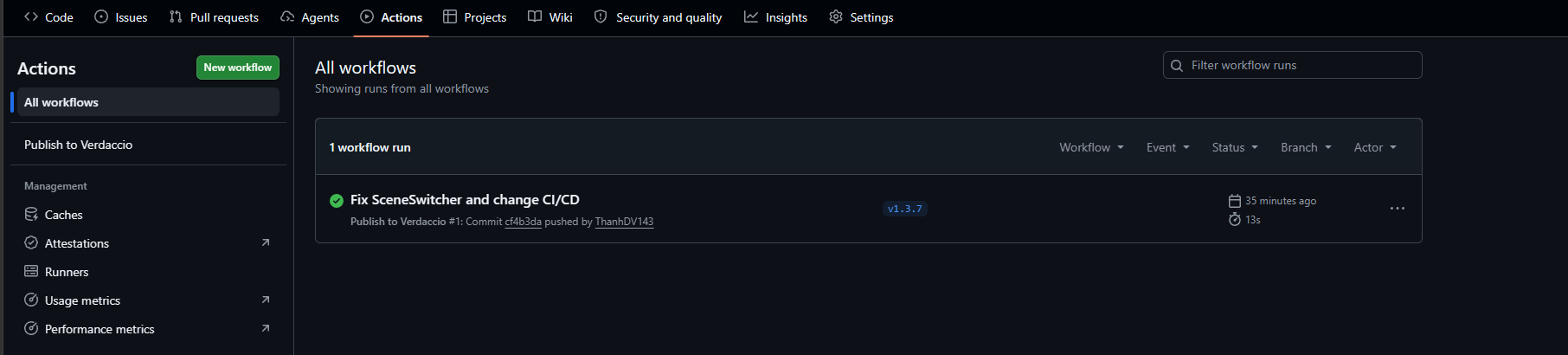
Nếu thấy bên side tab có hiện workflow bạn vừa tạo tức là đã không có lỗi cú pháp và GitHub đã nhận dược workflow.
Hiển thị như hình dưới tức là đã publish thành công.